Dashboard widgets
The Dashboard is an add-on module that extends the basic functions of the 446 Plattform®. The Dashboard is used to graphically process and display information about tickets, tasks Knowledge Base articles and other elements.
The Dashboard allows for the parallel processing and displaying of various kinds of information. For this purpose widgets are used to graphically display all the information according to their configuration.
A user is enabled to create or to configure a widget when the group he is a member of has the necessary permissions.
Configuring the Dashboard widgets is effected under Settings > Dashboard widgets. This page displays an overview of all widgets sorted by category and status.
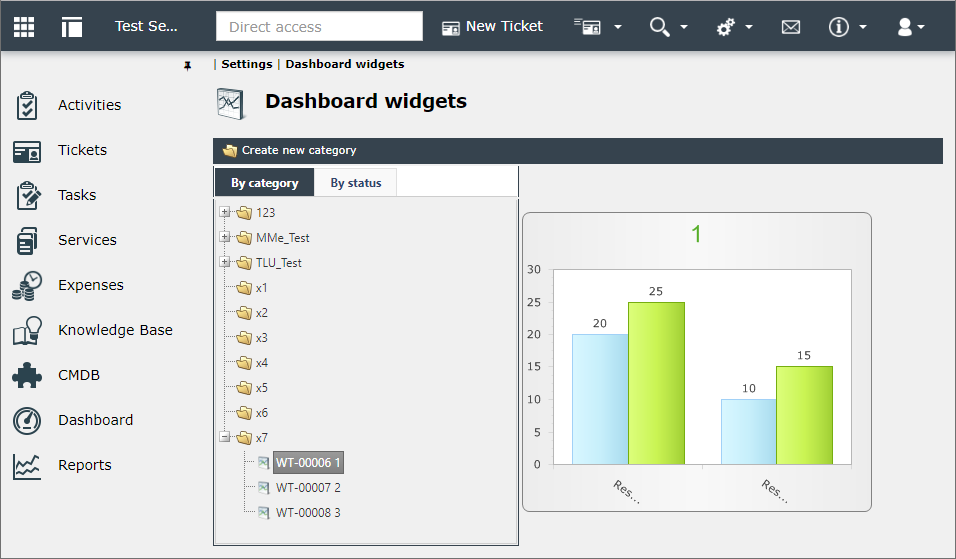
By category and By status are the available views for the Dashboard.
Categories are created to keep the Dashboard widgets and their information well structured and organized. In the User Management it is possible to assign permissions for these categories to several user groups to limit the usage of these widgets individually.
A new category is created by clicking on Create new category.
As the purpose of categories is to logically classify the widgets, only the Name and Description of the category can be defined. The description will be displayed as soon as the cursor is placed over a category. By right-clicking on a category the context menu is opened to edit or to delete a category or to create a new widget in this category.
The view By status allows for displaying the widgets according to their current status. If there are widgets in a certain status, the view can be expanded by clicking on the + icon to display all widgets in this status. Statuses and status changes can individually be regulated in the User Management.
Note:
Status changes define the statuses widgets can obtain from a certain status. The permissions for status changes are defined for a certain group in the Permission settings in the User Management. These permissions define the status changes that can be effected by users of this group.
Short instruction
Chapters:


 Copyright (c) 2000-2026 Isonet AG