External login accounts
External logins can be managed only by administrators under Settings > Administration > External login accounts.

Clicking the Add button opens the configuration window for a new login or clicking an existing login opens the configuration window for the login that has already been set up.
Chapters:
The login of type 'SAML' in the 446 Plattform identifies users by their chosen login name. The SAML registration is thereby suitable for the following application scenarios:
-
Single Sign-on (SSO, after successfully logging into a web application, a user is automatically eligible to use other applications)
-
Shared transactions (multiple users collaboritng on the same transaction and also share their security information)
-
Authorization services (the communication with a services goes through an intermediate stations, which checks the permissions)
-
Authentication and authorization of users for web applications running a cloud environment
Note:
In Azure AD portal, register your app as enterprise application to benefit from this login type. Further information regarding the configuration settings in Azure AD can be found at Microsoft under SAML authentication with Azure Active Directory and Advanced certificate signing options in a SAML token. Google also provides a step by step tutorial in their help center to Set up your own custom SAML application.
Tip:
Verify the configuration settings of your Microsoft products additionally with the Microsoft Remote Connectivity Analyzer!
After successfully registering up your application at the identity provider of your choice, you are now able to setup an external SAML2 login within the 446 Plattform.

Name: choose a meaningful name for your external login.
Warning:
Once a name has been entered, the 446 Plattform automatically generates an 'ACS Url' address according to the name.
Login button text: enter the text that you would like to appear on the login button. If you leave this field blank, the default text will be used.
Description: an additional description can be provided here.
Type: SAML2
Active: select the status of the external login. You are free to activate the login later at any time.
Use on mobile UI: if activated, an additional login button on the login page of the Mobil446 Plattform is available to you.
Assertion Consumer Service (ACS) URL: the address that is being automatically generated by the 446 Plattform based on the name you have entered.
Assertion Consumer Service (ACS) Logout URL (optional): the logout address that is being automatically generated by the 446 Plattform based on the name you have entered.
Certificate: the textual content of the PEM file certificate which was issued by your identity provider for the SAML2 login.
Note:
Download the certificate with the PEM file extension by clicking 'Single sign-on' and 'SAML Certificates' in your enterprise application settings in Azure AD. From there, hit the 'Edit' pencil icon and open the context menu (three dots) in the new window.
Open the file with a text editor afterwards. The certificate begins with the string '-----BEGIN CERTIFICATE-----'.
Endpoint: the URL for the login offered by your identity provider (e.g. https://login.microsoftonline.com/{tenant id}/saml2).
Endpoint signout: the signout URL for the logout offered by your identity provider.
EntityId: a unique name (Identifier/Entity ID). This information is being displayed in the 'Single sign-on' settings of your enterprise application in Azure AD within the 'Basic SAML Configuration' container.
Enable auto login: if this checkbox is enabled, the external login will be triggered automatically once a user visits the login page. Technically, requesting the login page of the 446 Plattform redirects you to the login mask of your identity provider. In the event of failure, the user is simply being redirect back to the login page of the 446 Plattform.
Note:
Choosing this option only makes sense if the majority of all users will be using this external login!
In the first step you register your application at an identity provider. An example setup for Microsofts Azure AD is being described in the App registration section.
| User context: | Application context: |

|
|
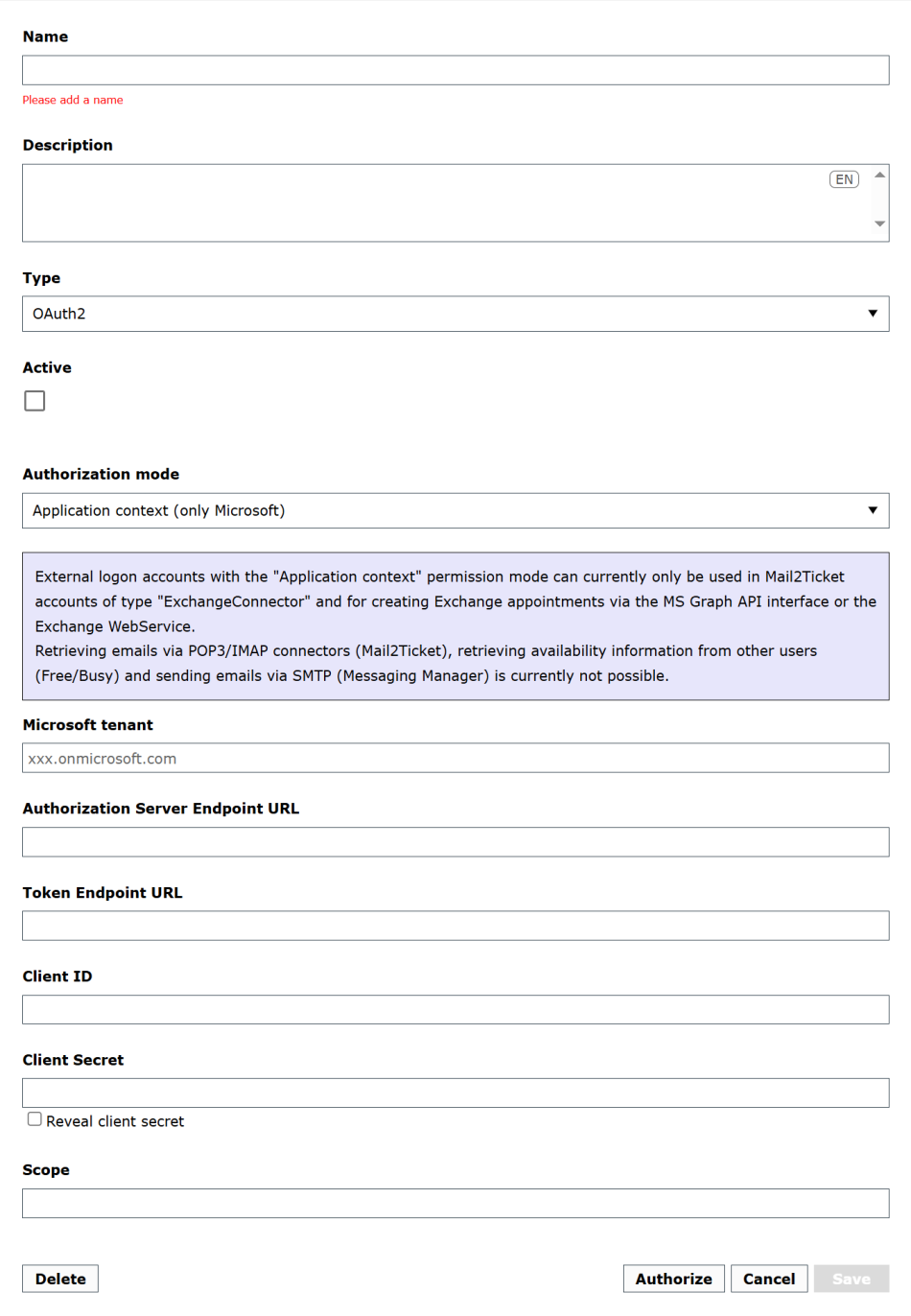
Name: choose a meaningful name for your external login.
Description: an additional description can be provided here.
Type: OAuth2
Active: select the status of the external login. You are free to activate the login later at any time.
Authorization mode: this is where the authorization mode for logging in is set. The possible values are User context and Application context.
Microsoft tenant (only Application context): The URI found under the name Primary domain in Azure AD must be specified here.
Authorization Server Endpoint URL: the OAuth 2.0 authorization endpoint provided by your identity provider.
Token Endpoint URL: the OAuth 2.0 token endpoint provided by your identity provider.
Client ID: the Application (client) ID of the app you registered at your identity provider.
Client Secret: a secret string that the application uses to prove its identity when requesting a token. (application password, Microsoft). Usually this secret can only be copied once after it's generation and has to be recreated in case of loss.
Scope: enter the API permissions, which you have set for your app at your identity provider, separated with a space, here.
Tip:
Visit Scopes and permissions in the Microsoft identity platform to find more examples on how to set the permission scope for Microsoft related applications. For Google, click on OAuth 2.0 Scopes for Google APIs to get an overview of the available scopes.
Example: https://graph.microsoft.com/Mail.ReadWrite offline_access
Redirect uri (only User context): an automatically, by the 446 Plattform generated address that you have to set at your identity provider for your application afterwards. The integrated OAuthManager (module: IsonetCoreExtended) is hereby responsible for the automatic exchange of the required data with the identity provider.
Explanation of the buttons:
Delete: this will take you to a confirmation dialogue, who asks you, whether you want to remove the whole data record or not.
Authorize: herewith you are able to verify the connection credentials as well as the OAuth settings (especially API permissions) of your application directly. You need the login credentials of your identity provider for the authorization. This authorization process is required to activate the OAuth login and is usually being done once.
Cancel: closes the dialogue window and discards every change made.
Save: closes the dialogue window and saves every change made.
Note:
Usually you only need one login with all the required permissions for Mail2Ticket, Mail delivery and the FreeBusy service.
If you like to use multiple mailboxes with different user accounts, you also need multiple identically configured External Logins which are permitted for the respective authorized user.
For example the authorization must be renewed each time the permissions in Azure AD are changed!
OAuth2
After successfully setting up your external OAuth2 login, the first thing you get is the ObjectGuid from the TXPE database and the table ExternalLogin.
An example query could look like this:
SELECT [ObjectGuid], [FriendlyName], [IsActive]
FROM [TXPE].[dbo].[ExternalLogins]
WHERE [Type] = 'OAuth2'
With this ObjectGuid, you configure the OAuth access for the following services:
-
Exchange-Webservices (Free/Busy, TicketToDo, Appointment)
-
Via SQL you setup the value of the keys Txp.Exchange.OAuthExternalLoginGuid and Txp.Exchange.AuthentificationMode within the Configuration of the ClientConfiguration table
-
Key: Txp.Exchange.ProviderType
Value: ExchangeWebservice or GraphAPI.
-
Key: Txp.Exchange.OAuthExternalLoginGuid
Value: The ObjectGuid of the (previously) configured external login of type OAuth2.
-
Key: Txp.Exchange.AuthentificationMode
Value: OAuthAuthorizationCode
-
-
-
Messaging Manager (mail delivery) (SMTP)
-
Via SQL you setup the value of the keys OAuthExternalLoginGuid and SmtpAuthMethod within the Configuration of the MessagingDelivererConfiguration table
-
Key: OAuthExternalLoginGuid
Value: The ObjectGuid of the (previously) configured external login of type OAuth2.
-
Key: SmtpAuthMethod
Value: OAuthAuthorizationCode
-
-
-
Bad Messages (SMTP)
-
Via UI of the 446 Plattform in Settings > Administration > Configuration settings, you setup the value of the keys BadMessageOAuthExternalLoginGuid and BadMessageSmtpAuthMethod (see also Table: Configuration Settings - System)
-
Key: BadMessageOAuthExternalLoginGuid
Value: The ObjectGuid of the (previously) configured external login of type OAuth2.
-
Key: BadMessageSmtpAuthMethod
Value: OAuthAuthorizationCode
-
-
Note:
All other messaging manager configurations - except 'BadMessageSmtpPassword' - are still necessary.
Note:
No database configuration is required for Mail2Ticket. The configuration is performed under Configuration of email accounts.


 Copyright (c) 2000-2026 Isonet AG