Configuration of email accounts
This article contains the configuration of various e-mail accounts for the Email accounts (mail reception). Depending on the selected account type, different selection fields are available. The 446 Plattform currently supports the account types ExchangeConnector, IMAP and POP3.
Regardless of the account type, you are free to validate the connection settings by clicking 'Test'/'Test connection'. Hit the 'Save' button to retain the information you have entered.
Types of accounts:
First, select the type of authentication.

Alias: Enter the name of the user for logging into (not accessing!) the mailbox (e.g. the alias of a Windows user account) with the permission to query the Mail2Ticket account that has been set up.
Password: The password of the user (e.g. Windows user) has to be entered here in order to query the account.
Domain: The domain the respective user exists in has to be entered here.
URL to Exchange Server Web Services (EWS): The Office 365 EWS Endpoint URL https://outlook.office365.com/EWS/Exchange.asmx.
Exchange Web Services version: Select your version of Exchange Web Services here.
Mailbox alias: Enter the name of the user for accessing (not logging into!) the mailbox. Leave this field empty to directly access the mailbox of the login user.
Exchange folder: The direct path (URL) to the folder (and sub-folder, if applicable) of the e-mail account is needed here. Via the Browse button (magnifying glass), the path can be edited.
Ignore file attachments: This checkbox determines whether file attachments are saved on the server and will be listed in the ticket view on the File attachments tab.
Allowed senders: This option restricts Mail2Ticket to certain senders. If the option Only the following e-mail addresses allowed is selected, the permitted senders can be entered. Whenever Mail2Ticket receives an e-mail from an unauthorized e-mail address, the e-mail will not be converted into a ticket.

OAuth Configuration: A preconfigured, external login of the type 'OAuth2' (see also External login accounts).
URL to Exchange Server Web Services (EWS): The Office 365 EWS Endpoint URL https://outlook.office365.com/EWS/Exchange.asmx.
Exchange Web Services version: All Exchange versions upwards since 2007.
Mailbox alias: Enter the name of the user for accessing (not logging into!) the mailbox. Leave this field empty to directly access the mailbox of the login user.
Exchange folder: The direct path (URL) to the folder (and sub-folder, if applicable) of the e-mail account is needed here. Via the Browse button (magnifying glass), the path can be edited.
Ignore file attachments: This checkbox determines whether file attachments are saved on the server and will be listed in the ticket view on the File attachments tab.
Allowed senders: This option restricts Mail2Ticket to certain senders. If the option Only the following e-mail addresses allowed is selected, the permitted senders can be entered. Whenever Mail2Ticket receives an e-mail from an unauthorized e-mail address, the e-mail will not be converted into a ticket.
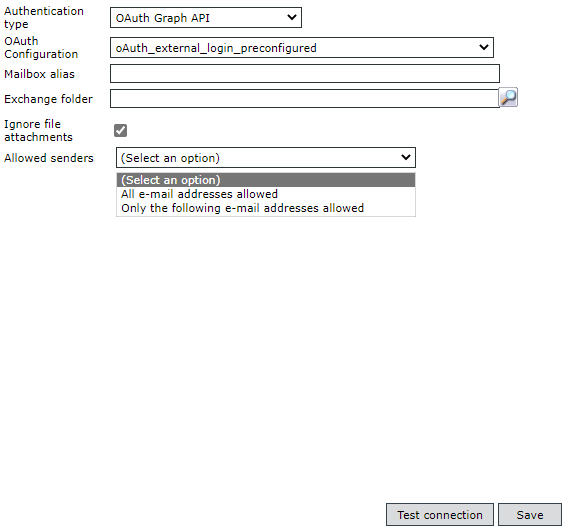
OAuth Configuration: A preconfigured, external login of the type 'OAuth2' (see also External login accounts).
Mailbox alias: Enter the name of the user for accessing (not logging into!) the mailbox. Leave this field empty to directly access the mailbox of the login user.
Exchange folder: The direct path (URL) to the folder (and sub-folder, if applicable) of the e-mail account is needed here. Via the Browse button (magnifying glass), the path can be edited.
Ignore file attachments: This checkbox determines whether file attachments are saved on the server and will be listed in the ticket view on the File attachments tab.
Allowed senders: This option restricts Mail2Ticket to certain senders. If the option Only the following e-mail addresses allowed is selected, the permitted senders can be entered. Whenever Mail2Ticket receives an e-mail from an unauthorized e-mail address, the e-mail will not be converted into a ticket.
>
First, select the type of authentication.
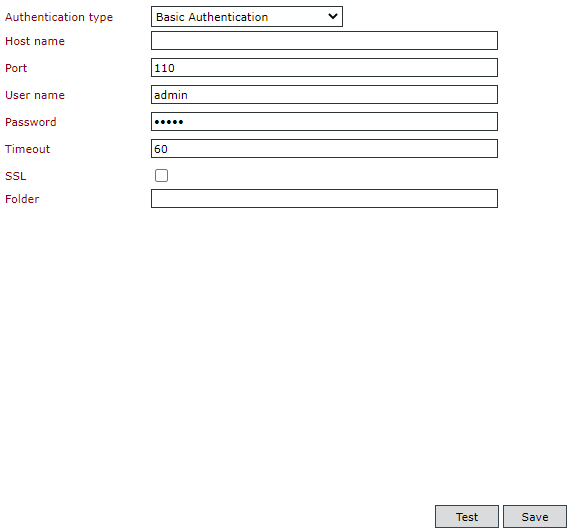
Host name: Enter the name or address of the IMAP incoming mail server. (FQDN).
Port: The port of the IMAP incoming mail server. By default the port TCP 993 is used for an encrypted (SSL/TLS) and TCP 143 for an unencrypted connection.
User name: The name of the user which is used for the login at the IMAP incoming mail server.
Password: The password for the login at the IMAP incoming mail server.
Timeout: The time in seconds until the connection drops due to inactivity.
SSL: Activate this checkbox to setup a secure connection for data transfer. Without this option, there will be no secure connection setup (regardless of the specified port).
Folder: The direct path (URL) to the folder (and sub-folder, if applicable) of the e-mail account is needed here.
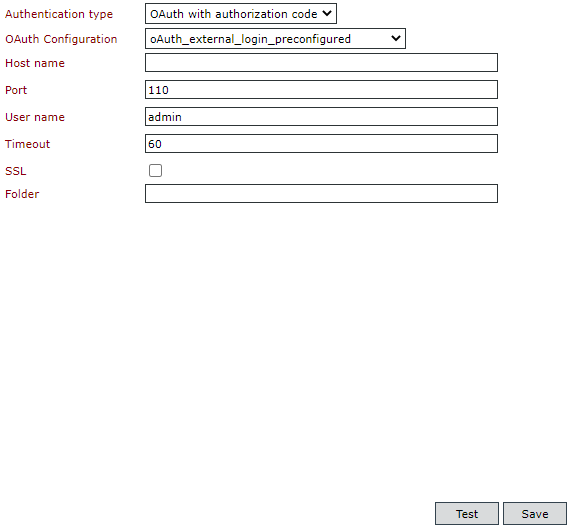
OAuth Configuration: A preconfigured, external login of the type 'OAuth2' (see also External login accounts).
Host name: Enter the name or address of the IMAP incoming mail server. (FQDN).
Port: The port of the IMAP incoming mail server. By default the port TCP 993 is used for an encrypted (SSL/TLS) and TCP 143 for an unencrypted connection.
User name: The name of the user which is used for the login at the IMAP incoming mail server.
Timeout: The time in seconds until the connection drops due to inactivity.
SSL: Activate this checkbox to setup a secure connection for data transfer. Without this option, there will be no secure connection setup (regardless of the specified port).
Folder: The direct path (URL) to the folder (and sub-folder, if applicable) of the e-mail account is needed here.

Host name: Enter the name or address of the IMAP incoming mail server. (FQDN).
Port: The port of the IMAP incoming mail server. By default the port TCP 993 is used for an encrypted (SSL/TLS) and TCP 143 for an unencrypted connection.
User name: The name of the user which is used for the login at the IMAP incoming mail server.
Password: The password for the login at the IMAP incoming mail server.
Timeout: The time in seconds until the connection drops due to inactivity.
SSL: Activate this checkbox to setup a secure connection for data transfer. Without this option, there will be no secure connection setup (regardless of the specified port).

OAuth Configuration: A preconfigured, external login of the type 'OAuth2' (see also External login accounts).
Host name: Enter the name or address of the IMAP incoming mail server. (FQDN).
Port: The port of the IMAP incoming mail server. By default the port TCP 993 is used for an encrypted (SSL/TLS) and TCP 143 for an unencrypted connection.
User name: The name of the user which is used for the login at the IMAP incoming mail server.
Timeout: The time in seconds until the connection drops due to inactivity.
SSL: Activate this checkbox to setup a secure connection for data transfer. Without this option, there will be no secure connection setup (regardless of the specified port).


 Copyright (c) 2000-2026 Isonet AG