Import
Within the CMDB, zones as well as CIs can be imported. Affected users, suppliers, and owners are filed in the User Management and cannot be imported via the CMDB. For those entities, it is necessary to use the import function (LDAP) of the User Management and/or to create the respective users and groups manually.
To configure the imports, navigate to Settings > Configuration Management (CMDB) > Import.

The tasks list various functions for editing an import:
- New import: A new import can be configured (see CI-Import).
- Edit import: An existing import can be changed.
- Execute import: An existing import is started (see Manual Execution of an Import).
- Queue: The queue management is opened (see Queue).
- Manage conflicts: The conflict management is opened (see Conflicts).
The article The availability of individual tasks contains further information regarding the user permissions of each individual task.
In order to start an already configured import manually, highlight the import to be used and select the action Execute import on the left. The following dialog will appear subsequently:
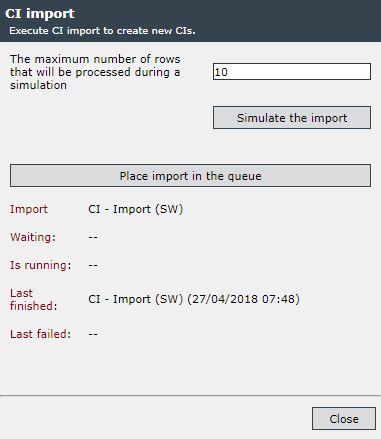
Via the button Simulate the import, the import is executed without changing any data. Subsequently, the results of the simulated import will be listed in a table. With this function, the general functionality of the import can be checked.
The button Place import in the queue initializes the import’s execution. The import will be executed in the background, i.e. if other imports are executed at the moment, it can take some time before it will be an import’s turn. This dialog can be closed and opened again later on in order to look after the results.
As soon as the information fields Waiting and Is running are empty and Last finished has been updated, the import has been executed. The CIs or the zones have now been updated in the CMDB.
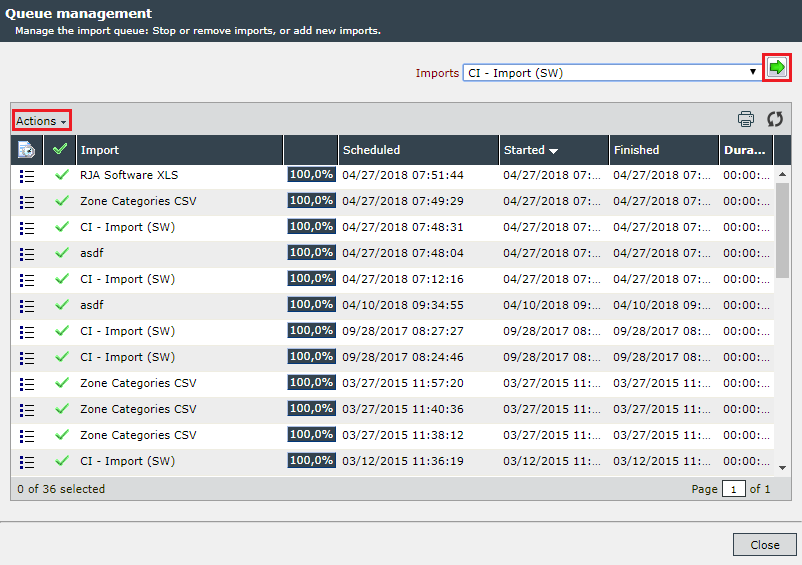
Selecting the action Queue opens the queue management. Here imports can be deleted or stopped via the Actions menu. New imports can be added to the queue using the green arrow at the top right. These are selected beforehand from the drop-down list.
Note:
Only those imports will be shown here where the user or the group has the permission to execute the import!


 Copyright (c) 2000-2026 Isonet AG