Task Life Cycles
The life cycle of a status is defined by the statuses to be passed through and reached as well as the dependencies between them. Thus, a structure of status dependencies has to be preplanned for every life cycle. In doing so, a start and end status have to be defined, which have to be reachable. Furthermore, every status apart from the end status has to have further reachable statuses.
The configuration of the task life cycles can be found under Settings > Task Management > Task Life Cycles. An overview of all previously created life cycles for tasks is displayed here.
The various life cycles can be created and managed here. Via the button New life cycle top right, new life cycles can be created. The Actions menu on the left allows for deleting them. Via a double click, already existing life cycles can be opened and edited.
Creating and Editing a Life Cycle
For creating a new life cycle, the button New life cycle can be used. As an alternative, a double click on an existing life cycle will open it for editing. The entire configuration of the life cycle can be performed in the dialog opening subsequently.
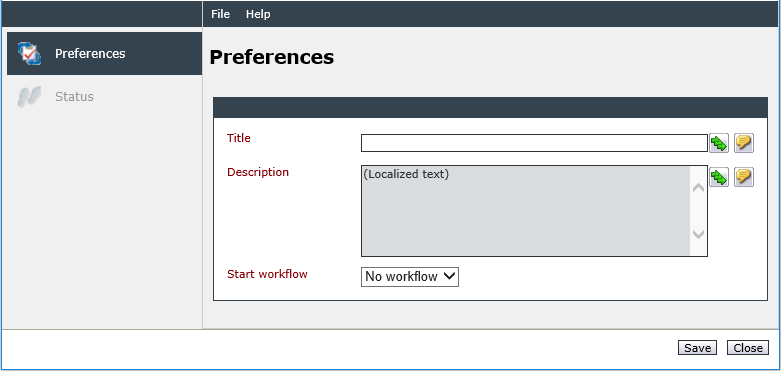
The following options can be configured on the Preferences tab:
Title: The name of the life cycle. It can be entered localized as soon as multiple languages have been licensed.
Description: A description of the life cycle can be entered here. It can be localized as well.
Start workflow: The task workflow specified here will be run through by every task based on a schema using this life cycle. Only workflows with the type Task can be used here (see also Related Topics).
On the Status tab, the various statuses for the life cycle can now be configured.

Click on the New status button. In the now opening dialog, statuses to be available for this life cycle’s tasks can be selected. The first status added will be set as the start status automatically.
Start status: The start status is the first status a task can obtain. The Start status tag can only be assigned once.
Cancelled status: This option is used for the ticket action Cancel successor tickets and tasks. When this action is performed in a ticket, all the tickets and tasks created from this ticket will be set to the status specified as the canceled status.
After a click on the Save button, the second tab Reachable statuses will become available. It can, however, be ignored until all of the desired statuses have been configured in the life cycle.
On the respective Reachable statuses tabs, the status(es) that can be reached from the various statuses can now be defined.

In order to define a new reachable status, click on the button New reachable status. In the next dialog, the following options are available:
Reachable status: Select the desired reachable status here. Only the statuses added to the life cycle previously are available.
Workflow: A workflow with the type Task can be selected here. This workflow will be initiated simultaneously to the start workflow as soon as a task reaches the status. The task or task workflow item will then run through both workflows at the same time.


 Copyright (c) 2000-2026 Isonet AG