Maintenance
Information on Regular Maintenance Tasks
Note:
In general, it is important to ensure that there is sufficient free storage space. This applies in particular to the hard disk space for the system drives as well as for the log files and the file upload folders. If the physical SQL server maintenance is performed, there must also be sufficient free storage space available there.
During a reboot of the server, all services should be monitored. After the server’s reboot, you have to check, whether all necessary services have been restarted as well.
If the server only contains parts of the installation (e.g. a server only containing the web sites or the web services), you have to make sure that all services have been stopped before.
If there is work to be done on the database server, you have to make sure that all services have been stopped. Otherwise, this can lead to irreparable damages of the database.
The 446 Plattform® data storage is mainly restricted to the database. Thus, it is of course essential to make sure that a daily backup is performed.
Backup of the Databases
The backup of the databases is described in another document. For this purpose, contact your project leader or your contact person at Isonet.
It is, however, important that all services are stopped during the data backup as well.
Replication of the Databases
A replication of the databases is certainly possible as well. If the amount of data (tickets, Knowledge Base articles, etc.) is high, this is even recommended. Then reports (being possibly time consuming), for example, can be outsourced to the replicated database and thus do not strain the productive database during the daily operations.
Warning:
Always mind to have enough disk space available for the replication. An initial replication needs as much disk space as the database itself. If the first replication is configured for a very large database, you have to make sure that enough disk space on the hard disk is available for the replicated data.
File Storage
In addition to the data in the database, various files are saved on the hard disk. The following types are among these files:
- Log files
File attachments
Bad-Messages (messages that could not be sent)
For a standard installation on a physical server, the paths to these data files can be found under C:\Program Files\Isonet\. For installations distributed on different servers, these files may be found in different locations (see also Configuration).
In order to preserve database performance over a certain period of time, it is necessary to maintain the database indexing at regular intervals.
One option is to use maintenance plans. These are created on the MS SQL Server in order to perform an automatic run at various intervals.
The following maintenance planning tasks should be executed periodically:
- Daily
- Reorganize index task
- Check database integrity task
- Update statistics task
- Weekly
- Rebuild index task
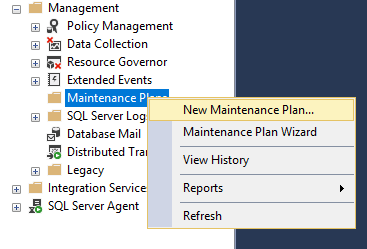
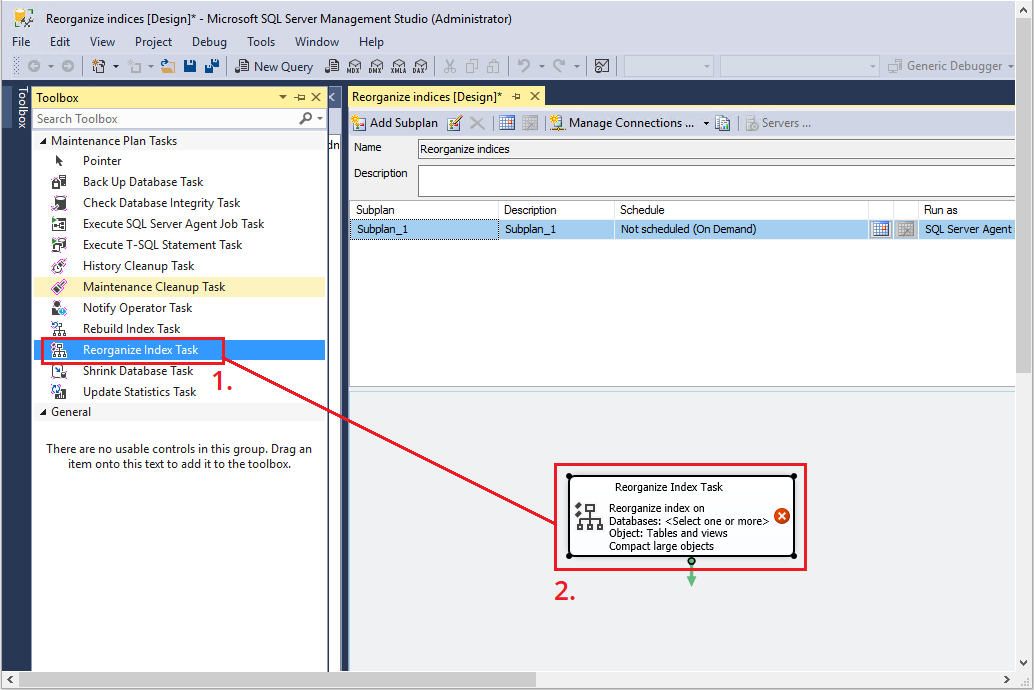
Example: Maintenance planManagement > Maintenance Plans right mouse button > New Maintenance Plan.
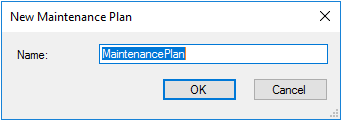
Enter a name for the maintenance plan.
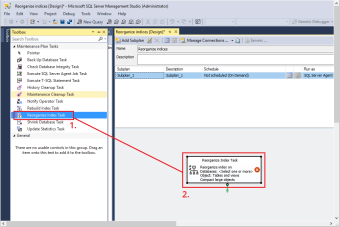
Open the toolbox and drag and drop the desired task (example: Reorganize Index Task) into the workflow section.
It is now necessary to create a time schedule for the task. Click on the Subplan Schedule icon next to the subplan. A dialog is opened to create a time schedule.
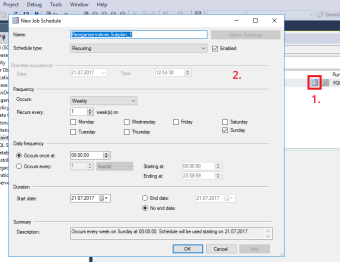
Enter all necessary information for the time schedule and confirm the dialog.
Repeat these steps with all maintenance tasks until your requirements are met. The maintenance tasks are periodically executed according to the defined set values.

Another more flexible database maintenance option is described with Ola Hallengren's SQL Server maintenance solution (https://ola.hallengren.com/). It describes scripts and backup options in detail.
Information on Network/Structure Changes
- Changes on the Mail Server (Mail Receipt – Mail2Ticket)
If the mail server configured for receiving e-mails in the 446 Plattform® (Mail2Ticket) is changed, the configurations have to be adjusted. Therefore, open the application and select Settings > Messaging & Collaboration > Mail2Ticket. Adjust the settings to the changed configuration of the mail server for every Mail2Ticket account there.
- Changes on the SMTP Server (Mail Dispatch – Messaging Manager)
If you modify the Messaging Manager, make sure that the service has been canceled before making the modifications.
For changes that affect the sending of e-mails, some settings must be made in the MessagingDeliveryConfiguration table. This table is in the master database. Various attributes that contain an SMTP server are listed here. These must be adapted to the new configuration.


 Copyright (c) 2000-2026 Isonet AG