Example application
This section shows how to integrate the 446 WebAPI into a custom solution to authenticate users through the 446 Plattform® and load user information. This example is intended to give a general overview of a particular technical solution. Other approaches are possible. The project (with source code) can be requested from Isonet GmbH.
The example is based on a Microsoft ASP.NET template and on a client side Angular application (Angular2+, ASP.Net MVC and OAuth2 should be known).
Purpose:
Call a user-defined menu item in the navigation bar to display the activities of the logged in user.
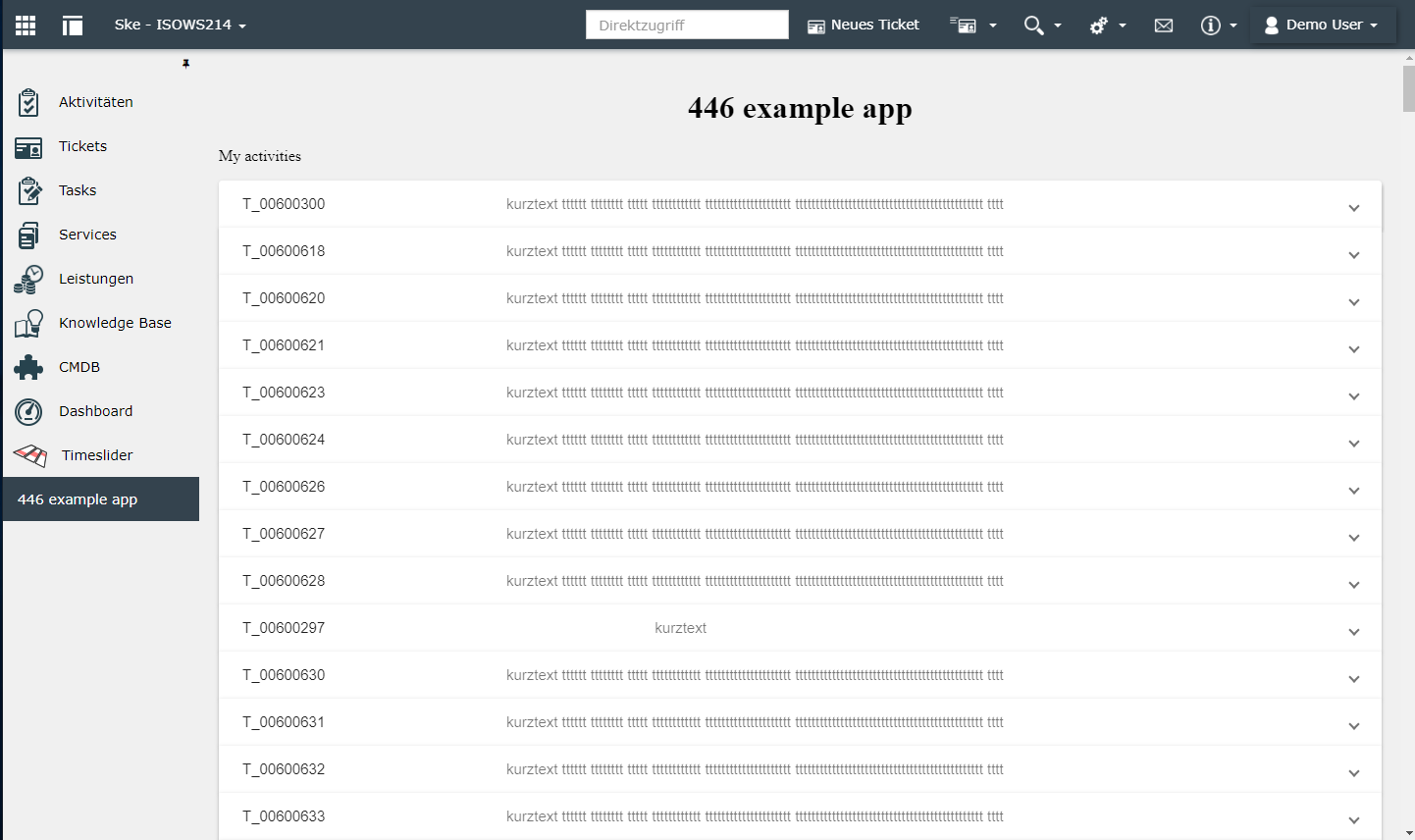
Only the ID of the ticket, the task text and activities are displayed in raw format.
Architecture
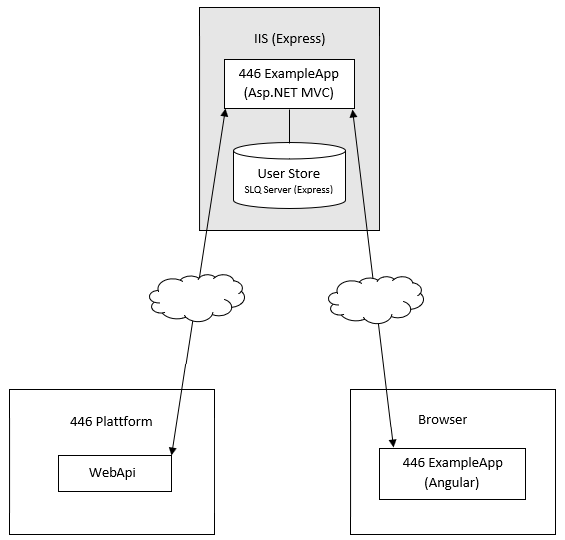
Essentially, the application consists of two modules:
- Server-side ASP.NET application
-
Client Angular Application
- Server-side application:
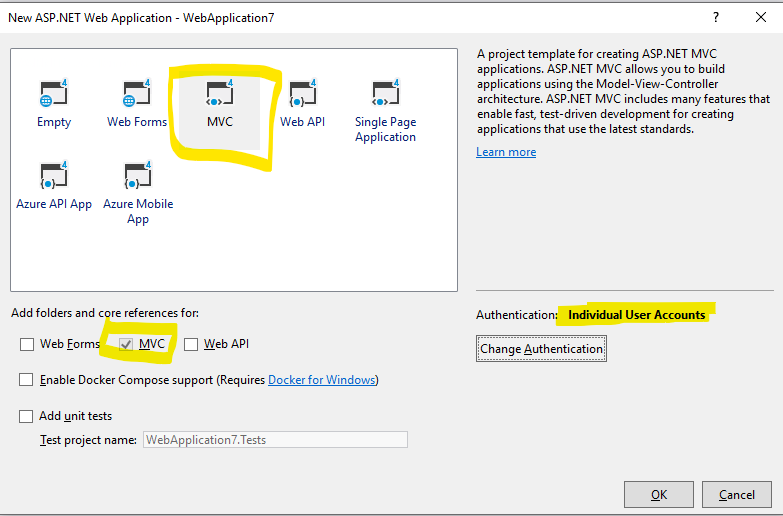
- The code is based on the standard example template of an MVC project in Visual Studio:

- Delivers the client application
- Authentication
First, the standard implementation of an MVC project is used. The application stores user data in its own SQL database. Depending on the complexity, it would also be conceivable for users to be kept exclusively in memory (implementing ApplicationUserManager).
Similar to the Microsoft standard example for external logins (Facebook, Google, etc.), the IsonetAuthenticationHandler (in the project Isonet.Owin.Security) implements the OAuth2 flow in order to obtain a token from the 446 WebAPI via grant type code. This token is saved in the user claims (SQL database). In addition, a refresh token and the expiration date of the token are stored.
- Communication with the 446 Plattform®
There is no direct communication between the browser application and the 446 Plattform®. The information is always retrieved from the server and then forwarded to the client.
If the communication is to take place directly, the bearer token must be transferred to the client. Please note that the token has a limited lifetime and may have to be renewed with the help of the refresh token.
In the project Isonet.446.WebApi corresponding auxiliary methods are implemented to facilitate the communication with the 446 WebAPI.
- Client side application
Angular was chosen as the application framework. It is also possible to use another framework or HTML/JavaScript to present the information of the 446 Plattform® in an appealing form.
Installation
Angular application
-
Installation of the npm packages (npm install)
-
Compiling the application (npm run build)
Asp.NET MVC
-
It is sufficient to open and start the solution in Visual Studio. The application is hosted in a temporary IIS Express process and the database is hosted in a local SQL database file.
-
For productive use, the application should be integrated in a real IIS environment. To change the database connection, adjust the connection string in Web.config.
-
It is recommended that you start the ASP.NET application only after a successful build of the client application.
Development environment
Changes on the client side must always be compiled from type script into Javascript bundles. The output is stored in the scripts directory of the ASP.NET application (...\Example446App\Example446App\Scripts\dist).
If the folder structure changes, the output path must be adapted in the file ...\Example446App\Angular\angular.json.
It is recommended to use the functions of the Angular CLI to facilitate the development process. The command npm run serve starts a local Node.js server. The application can then be accessed under localhost:4200. Changes are recognized when the type script files are saved and made available much faster. However, this mode means that the application is no longer hosted in the context of the ASP.NET application and the user is no longer authenticated.
Three additional adaptations are required so that an inquiry about the 446 Plattform® is still possible:
- Authentication is disabled in DEBUG mode.
See: …\Example446App\Example446App\Controllers\
ActivitiesController.cs::GetAll()
- A hard-coded Bearer token is used in DEBUG mode.
See: …\Example446App\Isonet.446.WebApi\
UserExtension.cs::GetAccessToken()
- The local Node.js server must redirect relative REST requests to the MVC application.
This is achieved by a proxy configuration.
See: …\Example446App\Angular\proxy.conf.json - Hier ist die URL der ASP.NET Anwendung einzutragen.
Integration into the 446 Plattform® user interface
The 446 Plattform® offers the possibility to add your own menu items to the navigation bar. The table NavigationExtensions and NavigationExtensionsLocalizations in the 446 Master database is extended for this purpose. A more advanced tutorial covering this topic is located within Extension of the left navigation menu with custom buttons.
First, you insert the value 'Html' into the column 'ContentType'. The Content column then contains the HTML code necessary for the classic view of the 446 Plattform to be embedded for this menu item. This is used to display an IFrame, which in turn embeds the application:
<iframe style="border:none;width:100%;height:100%;" src="http://446ExpampleApp /Activities" />
Note:
In the mobile view of the 446 Plattform, you want to use 'Url' or 'Script' instead as 'ContentType' for displaying the extension.
If the menu item is called up, the user is automatically taken to the login screen of the application. There the standard login form of the ASP.NET template is displayed. In addition, a login button appears as the result of the external log-in provider.
To hide the standard form, you can customize the MVC view and delete the corresponding code. All that remains is the login button. However, since the user only has the option to use this button, this step can be skipped and the authentication flow started directly. This logic is already implemented and is executed when the application is called with a URL parameter autoLogin.
<iframe style="…" src="http://446ExpampleApp /Activities?autoLogin=true" />
See also: …\Example446App\Example446App\Controllers\
ActivitiesController.cs::Index()
X-Frame-Options
If the two domain names are different, some browsers often prevent an HTML application or HTML page from being displayed within an IFrame. This can be solved by using the X-Frame Options in the HTTP response header.
See: …\Example446App\Example446App\
Global.asax.cs


 Copyright (c) 2000-2026 Isonet AG