Permissions - Task
Schemas
Permissions to the individual schemas of the tasks can be assigned to groups here.
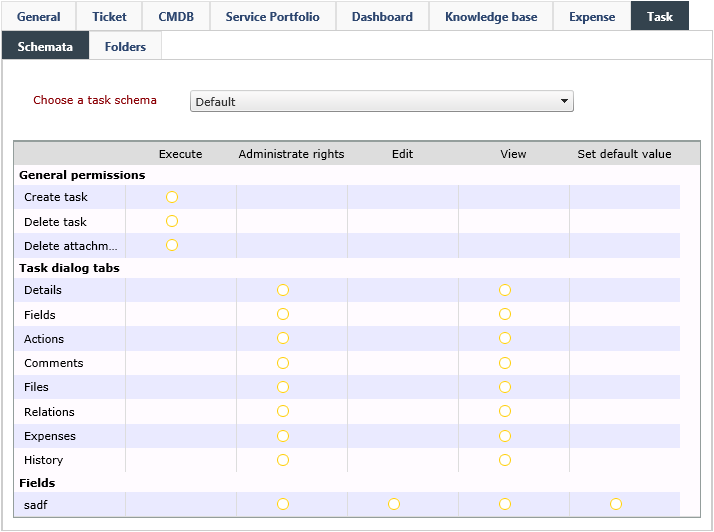
General permissions: The general permissions to the selected task schema can be set for the selected group here.
- Create task: If this permission is set, members of the selected group can create tasks with this schema.
- Delete task: If this permission is set, group members can delete tasks with this schema.
- Delete attachments: If this permission is set, members of the selected group can delete attachments contained in tasks with this schema.
Task dialog tabs: Activates the permissions Administrate rights and View for the various task detail dialog tabs. Via View, the respective tab will be displayed for users of the selected group.
Fields: The permissions for all already created dynamic fields can be set here.
- Administrate rights: See General
- Edit: The content of the field is displayed and can be changed, if the action Edit dynamic fields has been configured for this group as well.
- View: The respective field is displayed, but cannot be edited.
- Set default value: If only this permissions is set, group members cannot see this field, but the default value entered for it will be written into the field automatically by the system.
Folders
Permissions to the folders created in the Tasks stage can be assigned here.
General Permissions
Create new root folder: Via this right, the selected group can create main folders in the folder view.
Permissions to Individual Folders
Individual permissions on every folder displayed in the folder view on the left can be assigned for every group.
Administrate rights: See General
Create: Sub-folders can be created in the currently selected folder. They will inherit the permissions from the currently active folder.
Delete: Sub-folders contained in this folder can be deleted.
Edit: The current folder can be renamed.
Create task: Group members can create tasks in this folder.
Delete task: Tasks existing in the currently selected folder can be deleted, as long as the right Delete task on the Task Schemas tab has been activated for the current group and its task schema as well.
Visible: The folder will be displayed.
Distinctive Features of the Task Folder Permissions
In creating permissions for task folders, the inheritance leads to a distinct display within the permissions configuration. Folders, on which permissions have been set explicitly, will be displayed in boldface. This indicates that a so-called security tag has been created for this folder. It has been introduced in order to facilitate the determination of permissions. Moreover, one can see at first glance, on which folder permissions have been set explicitly (similar to the key icon in the User Management).
The permissions will be passed onto all hierarchically lower folders. This inheritance stops at a folder that has been assigned with rights explicitly. From this folder on, only its rights will be passed on.


 Copyright (c) 2000-2026 Isonet AG