Permissions - Knowledge Base
General Information
The Knowledge Base tab defines, which groups are to have access to the Knowledge Base and which permissions their members can exercise on articles in the Knowledge Base.
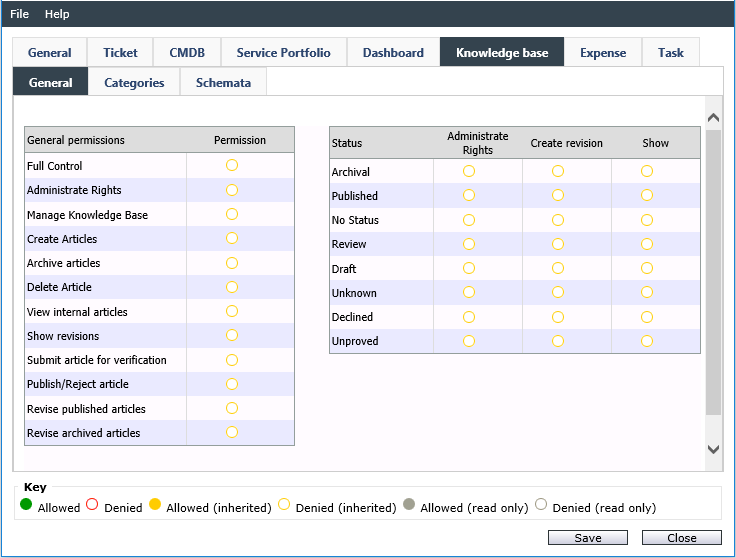
A typical permission configuration for a user group. For new articles not to be published unseen or unchecked, it is advisable to let different groups work on articles in different statuses.
General Permissions
Full Control: See General
Administrate Rights: See General
Manage Knowledge Base: The administrative options for the Knowledge Base will be available for all group members under Settings > Knowledge Management.
Create articles: If this option has been activated, members of the group can create new Knowledge Base articles.
Archive articles: If articles have already been published and a group owns this permission, every member of this group can set the article’s status to Archived.
Delete article: Members of a group can delete existing articles.
View internal articles: If this option is set to Allowed, members of the current group can see and are able to display internally published articles of the Knowledge Base. (If only this option has been activated, the Knowledge Base will not be displayed though. In order to view the Knowledge Base, the categories the users are to see have to be activated as well. If an internal article is not in a category visible to the group, it will not be displayed.)
Show revisions: If there are revisions for an article, they will only be displayed for members of a group if this option is activated.
Submit article for verification: Articles marked for review can be edited further by members of the current group.
Publish/Reject article: If this permission has been assigned to a group, its members can move articles with Draft status into the Published status.
Revise published articles: Already published articles can be revised.
Revise archived articles: Already archived articles can be revised.
Permissions to Statuses
For every predefined status, the following rights can be set:
Administrate Rights: See General
Create revision: If a KB article is in the respective status and this permission is enabled, the users in the respective group can create a new revision of the KB article.
Show: If set to Allowed, group members can view articles of a certain status.
Categories
The currently existing categories for the Knowledge Base are displayed here. If there are subcategories in a category, the permissions set here will be passed on to the subcategories automatically. If further subcategories will be created within a category later on, no permissions will be passed on to them; the assignment of permissions has to be performed separately in this case.
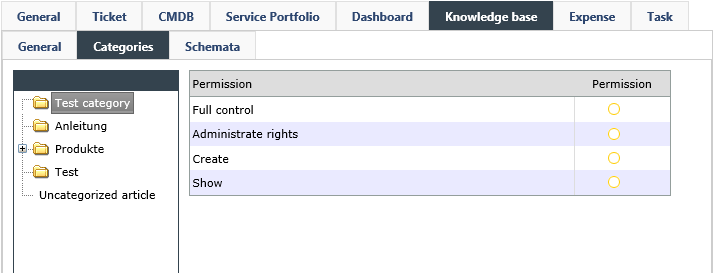
There are four options available for every single category:
Full control: See General
Administrate rights: See General
Create: Newly created articles can be assigned to this category.
Show: This category is displayed for all group members.


 Copyright (c) 2000-2026 Isonet AG