Permissions - Dashboard
Categories
On this tab, general permissions and permissions for the various widget categories of the Dashboard can be configured. These permissions are additionally connected to the assignment of permission on the Dashboard Statuses tab and to the permissions in the system settings.
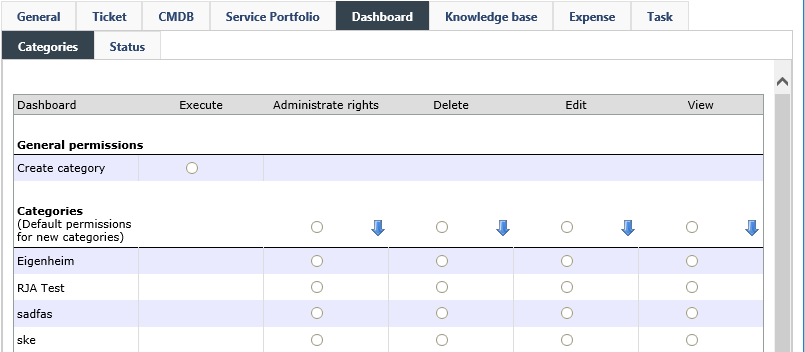
General Permissions
Create category: Group members are allowed to create their own categories in the Dashboard configuration.
Categories
The followings permissions for categories and the widgets contained therein are available:
- View: All widgets of this category are displayed. Simultaneously, the name and description of the category in the settings can be edited (provided that the permission Change settings has been activated for Dashboard widgets in the system settings).
- Edit: The widgets in this category can be changed in the settings as well. Additionally, new widgets can be created.
- Delete: Widgets of the category can be deleted.
- Administrate rights/Full control: See General
Statuses
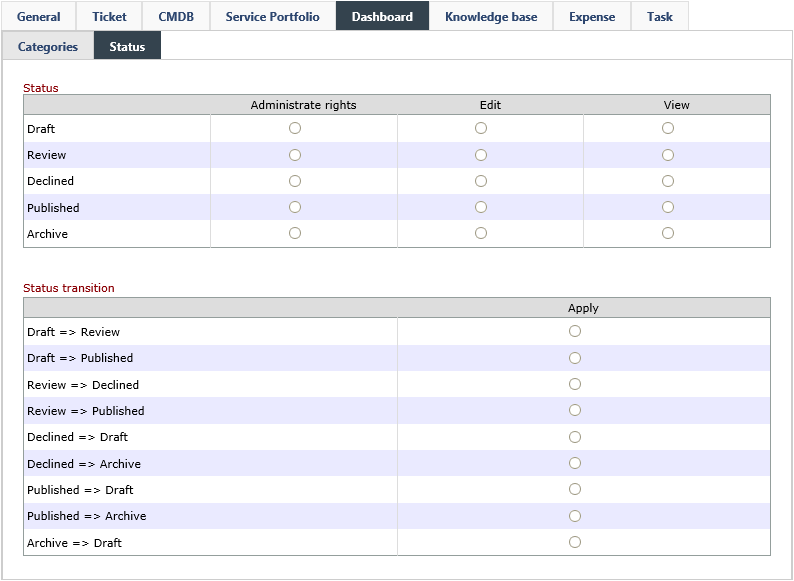
This tab allows for configuring permissions in a way that enables user groups to view widgets with certain statuses. If, the right Edit is assigned additionally to the right View, the available status changes, which can be executed by the group later on, can be configured in the bottom array of the dialogue. The tab Dashboard Statuses is closely related to the permissions of the Dashboard tab.


 Copyright (c) 2000-2026 Isonet AG