Ticket Number Ranges
Ticket number ranges are used to discern ticket types and to assign each ticket with a distinct ID. For this purpose, tickets are pooled in separate, independent number ranges.
General Information
The settings for ticket number ranges can be accessed via Settings > Ticket Management > Ticket Number Ranges. Here, new number ranges can be created, existing ones edited, and those no longer needed deleted.
New number ranges can be added via the button New ticket number range. Existing number ranges can be modified by opening the properties dialog with a double-click on the respective area. If a number range is not needed anymore, it can be deleted by using the Actions menu top left.
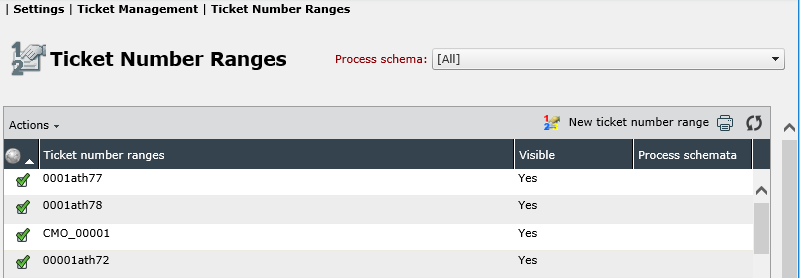
The process schema filter top right allows for filtering for certain ticket number ranges only used in a certain process schema, if the Service Portfolio has been activated. Global number ranges are marked with a green checkmark icon and can be used in multiple ticket and process schemas.
Configuring a Ticket Number Range
By using the button New ticket number range or by double-clicking on an existing number range, the respective properties dialog can be opened.
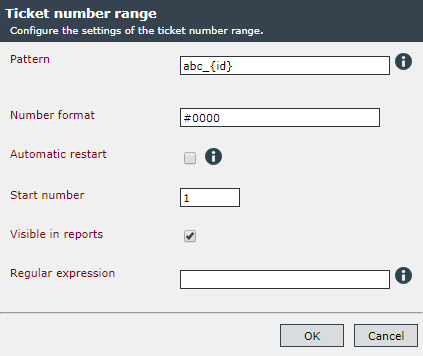
Pattern: Here you define how the ticket number is to be displayed in the ticket list. The only mandatory element here is the wildcard character {id}, which is supposed to contain the serial numbers of the tickets later on. In front of and behind this character, any optional text can be entered. If only the wildcard character {id} is specified, a ticket number range only containing the serial ticket number will be created.
Furthermore, time formats can be assigned as expressions here.
Example:
Display of the month and the year after the ticket number:
RFC_{id}/{$General.CurrentDate
The example above would result in the following display:
RFC_0001/06/2017
Input options for periodic format parts are, for example (see also Related Topics):
Day { $ General.CurrentDate[’dd’] $ } Month { $ General.CurrentDate[’MM’] $ } Year { $ General.CurrentDate[’yyyy’] $ }
However, only general and ticket expressions accessing information already existing during the ticket creation can be used here.
Dynamic number formats will not be applied to already existing tickets when the number schema is changed. Existing tickets will keep their originally assigned ticket number so they can still be found.
Number format: You define how the numbering is to be displayed instead of the placeholder. The formatting can include the following elements, which will have the following effect on the display:
0 Permanently assigned position # Optional position , Thousand separator
If the number contains more than four digits, more digits can be provided with the hashmark (#).
| Number format in the settings | Ticket numeration |
|---|---|
| #0000 | 0034 or 11038 |
| #000,0 | 0’034 or 11’038 |
| ####,0 | 34 or 11’038 |
Automatic restart: This option automatically resets the ticket number if a cyclic part of the ticket number changes. Example: If the month in the example above changes from April to May, the numeration of the tickets will be started over.
Start number: It indicates which number the first newly created ticket gets (can be chosen arbitrarily).
Visible in reports: This option can be used to control the display of the ticket with the affected ticket number range in reports.
Note:
If two or more number ranges use only the wildcard character {id}, the ticket number of tickets created via this ticket number range will not be distinct. Please use varying expressions or text for each ticket number range.
Regular expression: This expression is used to search within texts for the ticket number. The default value can be overwritten if ticket numbers are not recognized.


 Copyright (c) 2000-2026 Isonet AG