Value rules
Value rules are generally used for simplification. Complex conditions, which need to be used several times, for example, can be configured in value rules in order to be used in filtering rules at a later date.
On the left side, the tasks for the value rules can be found.
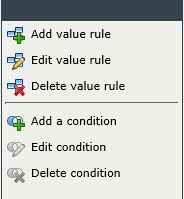
| Icon | Description |
|---|---|
|
|
These three buttons allow for creating, editing the name of, and deleting value rules. |
|
|
These three buttons allow for creating, editing, and deleting value rule conditions. |
 Add value rule
 Edit value rule
 Delete value rule
 Add a condition
 Edit condition
 Delete condition
Note:
Value rules will not be used by the system before they are used in the filtering rules.
Managing value rules
In order to create a new value rule, the button Add value rule can be used in the task menu on the left. In the following dialog, a name for the new rule is to be entered. If multiple languages have been activated on the system, the name has to be localized for each language. A click on OK creates the new rule. If an existing rule is to be modified, this very dialog can be accessed via a double-click on the rule.
Note:
Rules that contain invalid conditions or have not been fully configured will be displayed in red and cannot be used in the filtering rules before all conditions are valid.
In the next step, the conditions for the value rules have to be set (see Filtering rules).
After the configuration of the value rule has been finished, this rule can be used in the filtering rules. The condition Value rule allows for embedding existing valid value rules into the existing filtering system.


 Copyright (c) 2000-2026 Isonet AG