CMDB
| Icon | Description |
|---|---|
|
Add CIs to a Ticket
Old icon: |
Via this plug-in, CIs from the CMDB can be added to a ticket, whose workflow item is running through this plug-in. In the process, an attribute field can be specified, which will be compared to a certain ticket field. If the values match, the CI will be added to the ticket. If no CI can be found, the ticket field will be compared to the visible ID of all CIs. It is possible to define whether the ticket is to resume through the workflow even if no CI could be found. This means that the ticket can be stopped at this point if no CI corresponding to the criteria in the ticket can be found in the CMDB. Configuration CI attribute: The name of the attribute field to be compared to the ticket field. The option is optional, i.e. you do not have to specify it. If no attribute field is entered, the visible ID will be searched immediately. Continue if no CI could be found: Specifies whether the ticket is to resume through the workflow even if no CI could be found in the CMDB. If the value is set to True, the workflow item exits the plug-in through the output CI not found. The default value is False, where the item is blocked if no corresponding CI exists. Data field to store the names of the not added CIs: Stores all values from the specified ticket field, for which no corresponding CIs could be found. Separator: If multiple different values are stored in the ticket field, they can be separated by using this character. The default value is $. Ticket field: The ticket field to be compared to a CI attribute field. |
|
Add user to CI
Old icon: |
This plug-in sets a user as the affected user of a CI via expressions. Configuration CI ObjectGuid: The expression for determining the CI is to be entered here. An ObjectGUID must be returned here. User ObjectGuid: The expression for determining the affected user is to be entered here. An ObjectGUID must be returned here. |
|
CI status change
Old icon: |
Changes the status of the CI to the selected status if it is included in the life cycle of the CI. Configuration Status: Here, a previously configured status is selected. |
|
Create a CI
Old icon: |
Via this plug-in a CI can be created directly from a workflow item. Configuration Link CI to ticket?: Defines whether the newly created CI is to be linked to the ticket, from whose workflow item it has been created. The options here are: no link, an internally visible link, and an externally visible link. Schema: The CI schema to be used for creating the new CI. VisibleID: Either a fixed visible ID can be entered for the CI here (not recommended) or an expression can be used for reading out the visible ID from a data field of the workflow item, for example. Write VisibleID to data field: The data field of the workflow item the visible ID of the newly created CI is to be written into can be specified here. Zone: Defines the CMDB zone the new CI is to be created in. |
|
Create a ticket from a CI
Old icon: |
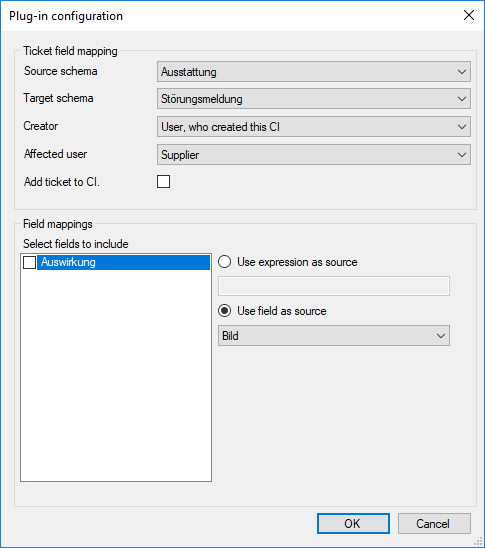
A ticket is created from the current CI. Configuration
Source schema: The CI schema whose fields are used for field mapping is selected. If the current CI is derived from another schema, no ticket is created. Target schema: The ticket schema of the ticket to be created must be selected. Creator: The user who is set as the creator in the ticket is determined. Affected user: The user is determined who is placed in the ticket as Affected user. Add ticket to CI: If this option is activated, the newly created ticket will be linked to the CI. Select fields to include: For each ticket field of the target schema, the following options can be determined after activation:
|
|
Delete CI link
Old icon: |
Via this plug-in, the link created to one or multiple CIs, e.g. in a ticket, can be deleted again. Configuration Search list: Here, you can enter a list of CI ids, separated by the specified separator. You can also enter a search term. All CIs attached to the ticket will then be searched for the search term in the specified CI attribute (see CI attribute). If the search term is found in a CI's attribute, it is considered a search hit. Please note that the CI ids and search terms are case-sensitive. Mode: The mode defines whether all links to CIs contained in the list will be deleted or those not on the list. Separator: Defines the character that separates all entries in the search list from each other. The entry of a separator is mandatory. Data field for the result: The data field of a workflow item, into which the result will be written after it has passed the plug-in. The entry of this data field is mandatory. CI attribute: This field allows for specifying the FriendlyName of a CI attribute. If no CIs from the search list are found, the plug-in searches for CIs with their visible ID. If the attribute remains empty, the visible ID is searched immediately. |
|
Is CI linked to user?
Old icon: |
This plug-in checks whether a user is specified as the affected user in a CI. Configuration CI ObjectGuid: The expression for determining the CI is to be entered here. The expression must return an ObjectGUID. User ObjectGuid: The expression for selecting the affected user is to be entered here. The expression must return an ObjectGUID. |
| Edit zones
Old icon: - |
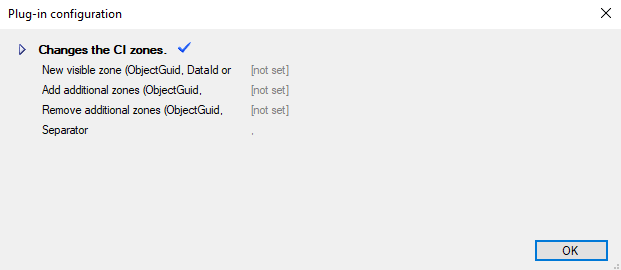
The plug-in is intended for use in the Configuration item workflow type. It changes the zones of the CI. The zone field is able to read simple GUIDs, but can also resolve expressions and data fields. The expected value type is the ObjectGUID, DataID or the FriendlyName of a CI zone. If the configuration is incorrect, an error exit is used. Configuration
New visible zone: The new CI zone can be entered here. Add additional zones: extra CI zones for CIs can be added here Remove additional zones: extra CI zones for CIs can be removed here Separator: custom delimiters can be set here (default is the point character .)
|
|
Remove relations
Old icon: - |
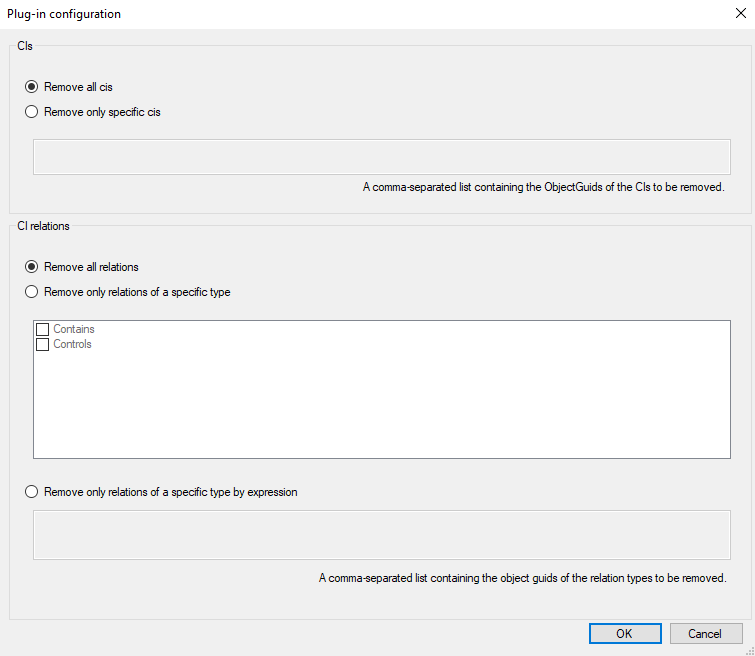
Removes all CIs, CI relations or only relations of a specific type.
Configuration
The following options are available:
* A comma-separated list containing the ObjectGuids of the CIs to be removed can be set here. ** The CI relation type is to be set in the settings within CI Relation Types. *** A comma-separated list containing the object guids of the relation types to be removed can be set here. These can be found in the database 'CMDB' and the table 'CIRelationTypes' in the column 'ObjectGuid'. Example: {# "A6A79BF8-D6F1-454D-A0B6-FB5F6AEE1C1D,72303CBF-F3C4-4BA1-9026-65E1FA916005" #}
In this example, the CI relation types shown in the figure are used. Their ObjectGuids are specified as a comma-separated list.
|
|
Set field of attached CI
Old icon: |
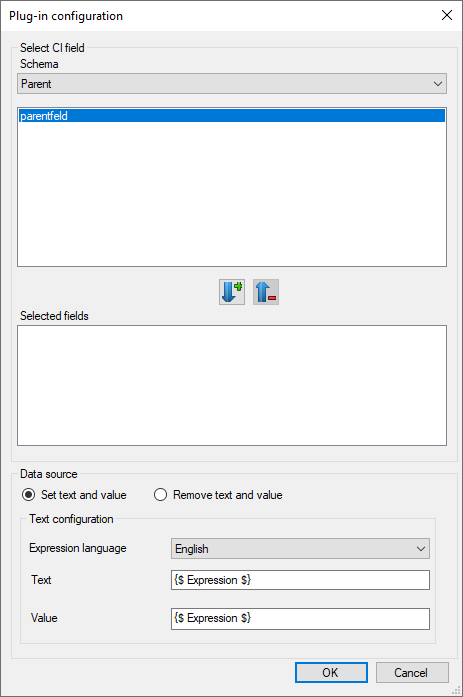
Via this plug-in, an arbitrary field of a CI attached to a ticket can be set. Configuration
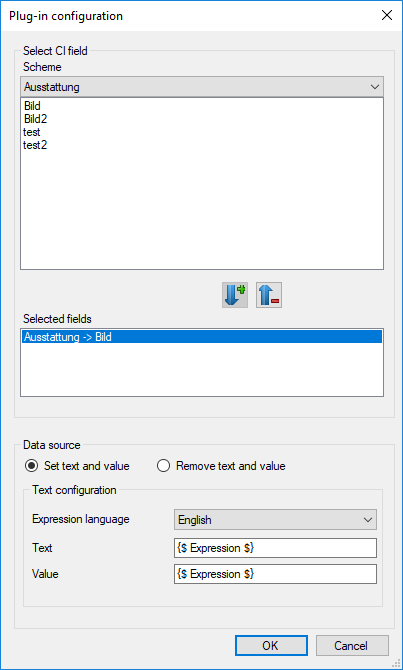
Select CI field: The CI field to be filled in (dynamic field of the CI schema) can be selected for each available schema here. In the process, it is possible to select different fields for different schemas. However, please note that only the expression specified under Data source will be used for filling in the various fields later on. If the current CI is not one of the schemas specified by the selected fields, the plug-in will be passed unchanged. Data source: In this section, texts and values of the fields specified above can be determined or deleted.
|
|
Set field of ci
Old icon: |
This plug-in changes the value of a field of the CI. This plug-in can be enabled and disabled (red cross). Configuration
Select CI field: The CI field to be filled in (dynamic field of the CI schema) can be selected for each available schema here. In the process, it is possible to select different fields for different schemas. However, please note that only the expression specified under Data source will be used for filling in the various fields later on. If the current CI is not one of the schemas specified by the selected fields, the plug-in will be passed unchanged. Data source: The following options are available:
|
|
Set fields of a CI
Old icon: |
By means of this plug-in, any dynamic fields of any CIs can be set. Configuration Ticket schema: Here you can set a ticket schema for which the conditions apply. CI schema: Here, any CI schema can be set. CI visible id: In this field either a fixed display ID (visible ID) of a CI can be entered or alternatively an expression by which the correct CI is determined. After these settings have been made, the desired dynamic fields can be selected under Field mappings. A Source value (ticket field) and a Target value (dynamic field of the CIs) can be selected as soon as they are selection fields. Otherwise, the source field content is written directly into the target field. |























 Copyright (c) 2000-2026 Isonet AG