Plug-ins General
In order to maintain clarity, all plug-ins are divided into categories. The following figure shows the individual categories. Chapter Plug-ins Description illustrates all plug-ins in the same order, including their respective configuration options.
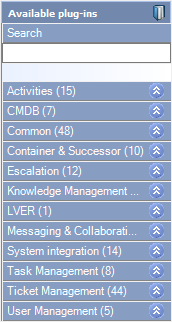
The Workflow Designer side bar with the plug-in categories.
Warning:
Not every plug-in can be used in every workflow type (Ticket, Early warning workflow, Knowledge base article, etc.) and every workflow category (Primary, Secondary, Escalation, etc.). For this reason, a plug-in is only displayed if it can be used in the corresponding workflow (and is licensed).
The examples mentioned in this document do not always represent a complete and workable workflow, but were selected to illustrate the use of plug-ins.
Note:
Sometimes, you need Object IDs to configure plug-ins. You can find out where to locate these IDs on the following page: Ids.


 Copyright (c) 2000-2026 Isonet AG