Data
- Dependencies
There are five different dependencies:
- Existential Dependency
Definition: A is existentially dependent on B, if A cannot exist without B.
Example:
A ticket field (A) cannot exist without the respective ticket schema (B).
- Functional Dependency
Definition: A is functionally dependent on B, if A cannot function correctly without B.
Example:
A workflow (A) using a certain ticket field (B) cannot not work correctly, if this field does not exist. The workflow can, however, exist without the ticket field theoretically.
To avoid an inconsistent target system, dependent objects are automatically selected for import when these two types of dependencies occur.
- Link
Definition: A is linked to B, if there is a connection from A to B.
Example:
A CI linked to another CI.
Dependencies of this type will not be imported automatically during partial imports.
- Partially Existential Dependency
Definition: A is partially existentially dependent on a set of entities B, if A cannot exist without at least one entity from B.
Example:
A user is partially existentially dependent on the set of his parent groups. That is, the user can only exist if at least one of his parent groups exists.
- Default Entity of a Partially Existential Dependency
Definition: In the set of entities B of a partially existential dependency, one entity is emphasized. This entity is called the default entity of the partially existential dependency.
Example:
The main group in the User Management. It is an emphasized group among the parent groups of a user.
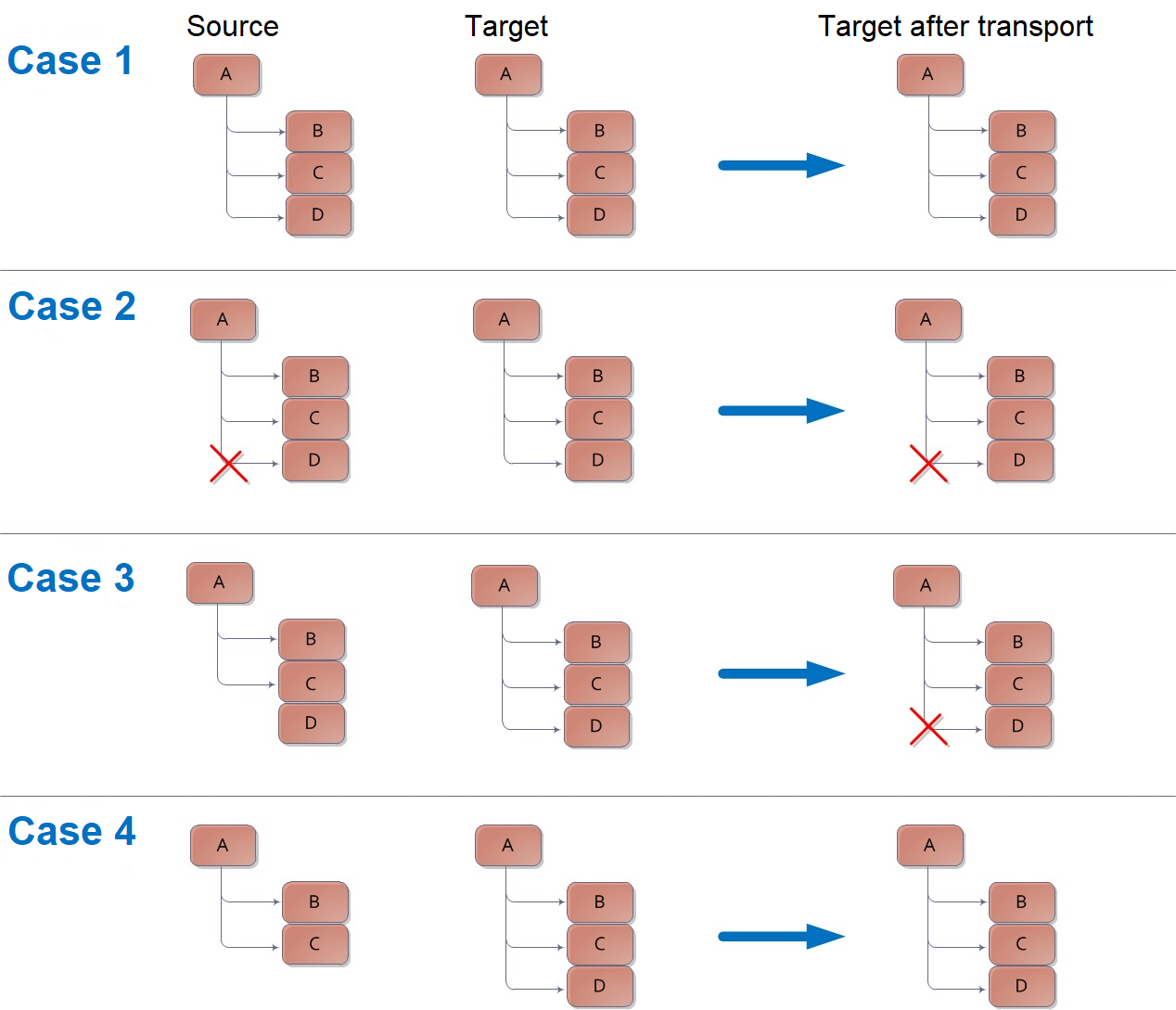
Figure: The transfer behavior of lists
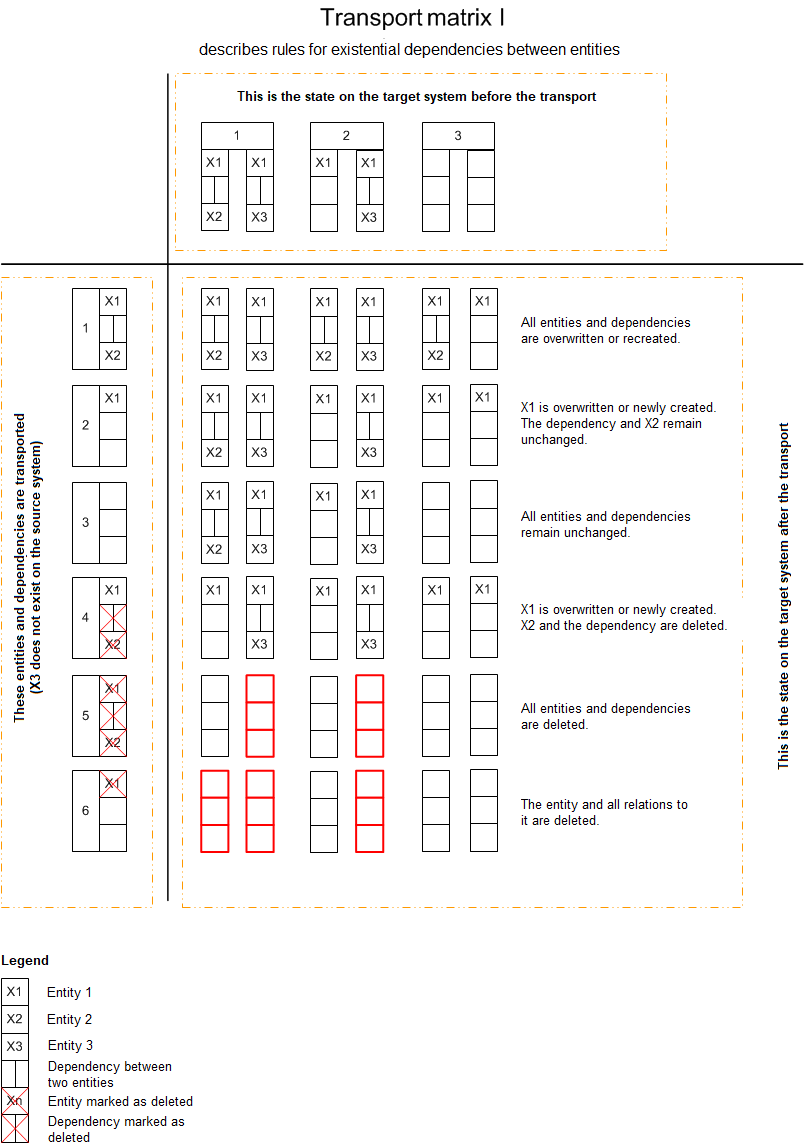
Figure: The transfer matrix for the behavior of the dependency types I, II, and III
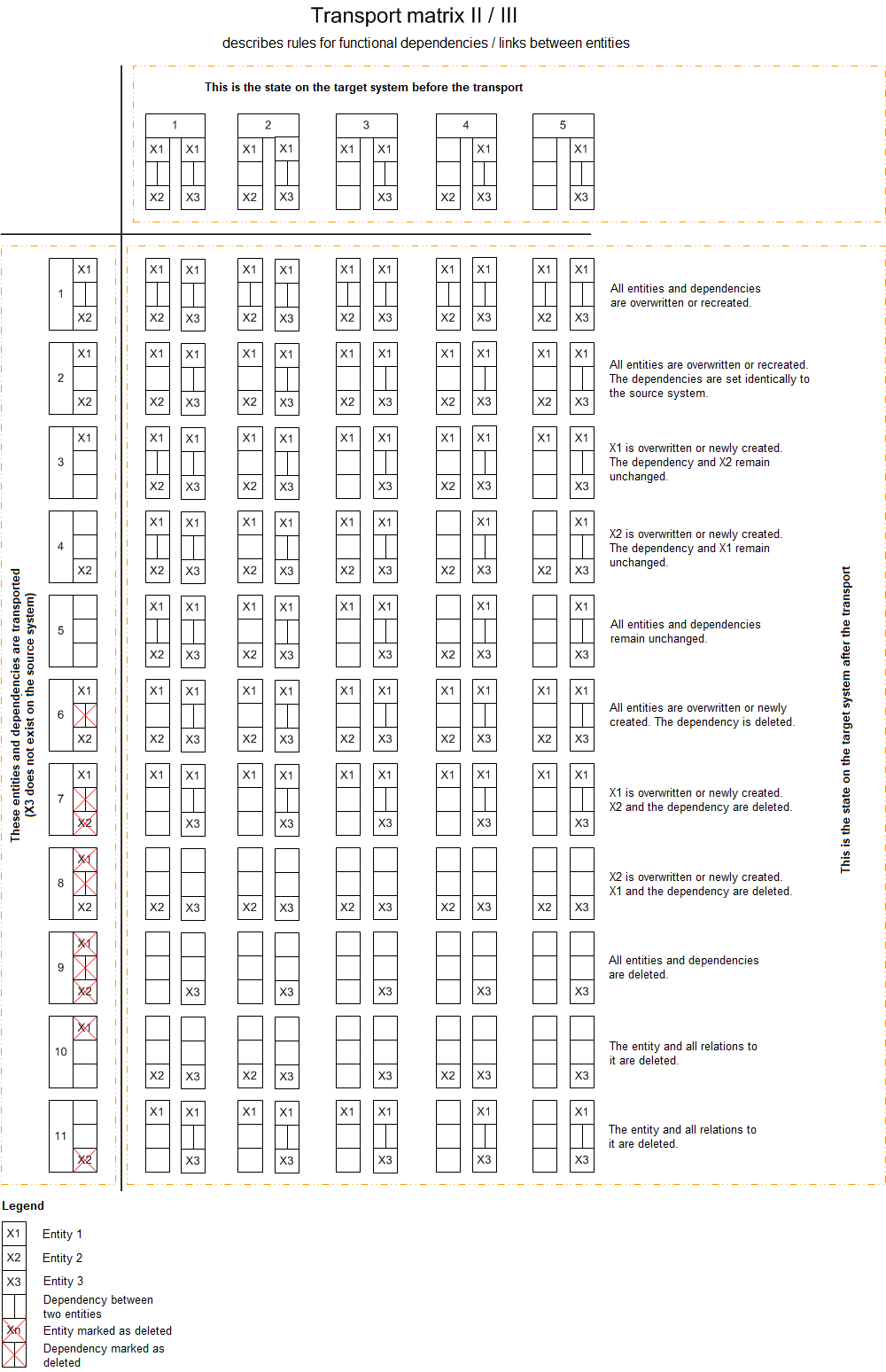
Figure: The transfer matrix for dependencies and links between entities
Dependencies are treated as follows:
- If the linked entities are dependent on the origin entity (e.g. child elements on their parent elements), the origin entity does need not a list of dependencies on the linked entities. This is always the case for the dependency type 1 (never dependency of parent element on its children necessary). In this case, there are no actual lists..
- If the linked entities do not know about the origin entity (e.g. a ticket status does not know, in which workflow plug-ins or ticket actions it is used), the origin entity has to have dependencies on the linked entities (here: lists).
The TM compares the list contents of the target system with the transport package and has the following functions for this:
- Only dependencies of type I and II that are not known in the transport package may be removed from the target system. Unknown entities must be retained. This concerns both the effective import and the validation.
- In some cases, mutual dependencies exist, e.g. CI-CI (Type III dependencies). In these cases, the same logic is used as above (match list, but ignore unknown entities).
- Overview of data not to be transported
The following data is not part of the configuration settings for an export and import or is an exception:
- Dynamic data (tickets, expenses, KB articles, e-mails, dispositions, tasks, task folders)
- Image files (e.g. icons for statuses - These have to be copied to the right position in the file system.)
- Imported services and transactions of the Service Portfolio
- Archive settings
- CMDB import queue and import conflicts
- Basic configuration
-
Maintenance
- Worker Management
- User-dependent data (accounts, filters, favorites and widgets)
- Reports and report groups
- Configuration files and their contents (*.config, worker configurations)
- Fields triggering actions and saving no values
- Display options saving no values
-
Cross-client settings
-
The SQL tables ClientConfiguration, GlobalConfiguration and ConfigSettingsSystem
- Automated Event Management
The following Automated Event Management data can be transported through the TM:
- Connectors
All connectors with all contained configuration settings can be transported.
- Filter rules
All filter rules can be transported. The hierarchy of the filter rules, the sequence of the filter rules, and all conditions of each rule are taken into account.
- Value rules
All value rules including their hierarchy and conditions can be transported.
- Event ticket mappings
All mappings can be transported.
- Configuration Management (CMDB)
If the Include dynamic data option is activated during the export, CIs are treated as configuration data and those whose schemas have been selected are transported.
In addition to CIs, the following CMDB data can also be transported:
- Relation types
All created relationship types including all fields will be taken into account.
- Life cycles
All configured life cycles can be transferred. Every life cycle contains status configurations as well as their transitions. Icons will not be exported, only a link to the file on the import server.
- Schemas
The configured CMDB schemas are transported, differentiating between CI and zone schemas (the types are also taken into account).
CI schemas
All information for CI schemas can be transferred. Icons will not be exported, only a link to the file on the import server.
Zone schemas
All configure d zone schemas including the default hierarchy will be transferred. Icons will not be exported, only a link to the file on the import server.
Types
All configured types will be transferred. Icons will not be exported, only a link to the file on the import server.
- Import
All configured imports are considered and transported. Conflicts and conflict solutions, on the other hand, are transaction data and are not transported (nor are the import queues).
- Configuration Management Database
The entire zone structure as well as all CIs contained in it can be transferred, depending on the export settings.
File attachments will be exported binary along with a hash.
CI relations will be transferred as a type III dependency here.
- Computer Telephony Integration
All CTI data, such as extension numbers and master numbers, can be transported with their configuration.
- Dashboard
The Transport Manager can transport all available categories and the master widgets created in them with their configuration.
However, user-specific customizations of widgets are transactional data and are not considered.
- Early warning system
The available early warning items with all details and configured rules are transported.
- Expense Management
The following Expense Management data can be transported:
- Projects
All projects and the configured fields contained therein as well as cost centers with their fields can be transported.
- Expense types
All configured expense types including all their fields can be transferred.
- Allocation Types
All allocation types including all configuration settings can be transferred.
- Knowledge Management
The TM can transport all KB categories and Knowledge Base schemas. It is not possible to export KB articles, since these transaction data are similar to tickets.
- Categories
All categories with localized texts and their hierarchies can be transported.
- Schemas
All existing schemas with localized texts, validity, configured actions, resubmission configuration and status transitions can be transported.
- Messaging and Collaboration
The following messaging data can be transported through the TM:
- Dynamic placeholders
All dynamic placeholders are transported. All (localized) standard and placeholder texts and all stored conditions must be taken into account.
- Information
All defined categories can be transported. This also applies to all information, regardless of whether it is marked as active/inactive or whether the current date is outside the start and end date. All fields and image data filled-in in the information will be transported.
- Mail2Ticket
All active and inactive Mail2Ticket configurations will be transferred.
As soon as a configuration has been transported to the target system, the Active flag is deactivated to prevent unwanted retrieval of e-mails. If the configuration already exists, the flag is not overwritten (unless the configuration is changed by the TM).
- All settings in the account information are transported.
- Create user: This information represents a dependency on user management. Imported users that are in use are not transported.
- – Affected user: This information represents a dependency on user management. Imported users that are in use are not transported.
- Ticket schema: This field represents a dependency on a ticket schema.
- Service transaction: This field represents a dependency on a service transaction.
- Configuration Item (CI): This field represents a dependency on a CI from the CMDB. The CI dependency is only exported if the CI belongs to a schema that was activated for export by the transaction data selection.
- Reference to: This field represents a dependency on a ticket field in a ticket schema.
- Text to: This field represents a dependency on a ticket field in a ticket schema.
- The settings on the Configuration tab are transported completely. Entered passwords are transferred encrypted.
- All keyword mappings are transferred. There is a dependency on each referenced ticket field.
- The configuration of the SLM priorities of a Mail2Ticket account can also be transported. This is dependent on Service Level Management.
- The assignment of reply e-mails can be transported to a workflow using the ticket status. For each referenced ticket status and workflow there is a dependency that is correctly resolved by the TM.
- Messaging schemas
Configuration Management transports all configured message schemas, their groupings, and the list of configured groups. The assignment to process schemas is retained.
- Templates
The TM transports all templates. All (localized) standard and placeholder texts as well as all stored conditions are taken into account.
- Reporting Management
Reports and their configuration are not transported.
- Service Level Management
The following SLM data is transported:
- Early warning system
The TM can transport all configured early warning rules. All standard fields and defined rules with the stored conditions are taken into account.
- Service Level Management
During an export, all settings of contracts, services, priorities and coverages are taken into account. Static file attachments will be exported binary along with a hash.
- Service Portfolio Management
The TM takes service life cycles and schemas into account. Configured service catalogs, services and service transactions are also transported.
- Service life cycles
Service life cycles are transported with the contained data and options (details and status). Icons are not exported, only a link to the symbol file on the server.
- Service schemas
Service schemas are transported together with the specified data and options (details and dynamic fields).
- Service catalogs
Service catalogs are transported with all defined settings (details and attachments).
- Service categories
Service categories are transported with names and descriptions.
- Services
Services are transported with their defined data and options (details, field values, CI links, SLP assignments, attachments).
-
Service transactions
Service transactions are transported with all data and options (details, role assignments, SLP assignments, CI links, file attachments).
- Task Management
The following task management data can be transported:
- Task status
All task statuses with associated fields are transported, regardless of visibility. Icons are not exported, but a link to the symbol file on the server.
- Task schema
All task schemas are transported with the corresponding configuration settings.
- Task life cycles
All life cycles and the associated fields (name, description, and initialization workflow) are transported.
Additional configurations are transported for the individual actions.
- Ticket Management
The following Ticket Management data can be transported:
- Ticket number ranges
All configured ticket number ranges are transferred.
- Ticket templates
All configured ticket templates as well as their grouping will be transferred. All file attachments will be exported binary along with a hash.
- Ticket Filter Management
All globally defined filters as well as selected statuses will be taken into account. Defined search texts will be also adopted.
- Ticket status
All configured ticket statuses will be transferred. Icons will not be exported, only a link to the icon file on the server.
- Ticket conversions
All ticket conversions are transferred, regardless of whether they have been marked as active or inactive. The fields defined for availability are transferred. Statuses and workflows are also transported as dependencies. The assignment of the source fields to the target fields is transported completely.
- Classifications
All configured classifications for tickets will be exported.
- Ticket wizard
The Ticket wizard will be transferred completely, including all pages, sections, fields, field configurations, and general options. All configured values will be taken into account.
- Ticket schema
All configured schemas will be transferred including all existing fields.
- Ticket actions
Every configurable field of an action is exported. All configuration fields are transported, even if a configuration value is a dependency.
- User Management
All users and groups as well as existing relations within a client will be transferred.
Note:
User passwords are stored in encrypted form in the transport package.
Warning:
Users that were created on the source system and whose password was changed subsequently can only login to the target system if they have logged in to the source system at least once with the changed password (for initialization).
A group or a user can be a member of several groups. In such a case, the group or user will be displayed in the tree view as a member of each of these groups. However, it still remains always the same group or user - these are merely multiple group memberships of the same entity.
For the most part, the permissions assigned or denied in all areas/categories for user groups in the export package are exported. Inherited permissions are not taken into account because they result from group membership.
The following rights are excluded from this:
- Permissions on dashboard statuses
- Permissions on dashboard status changes
- Permissions on report groups and individual reports
-
Permissions on task folders and task packages
Note:
Users and groups are entities relevant for peripheral systems.
- Workflow Management
The following Workflow Management data can be transported:
- Workflows
All workflows including their corresponding plug-in configurations and all dependencies will be taken into account and transferred.
- Forms
Forms contained in workflow plug-ins will be taken into account and transferred including their specified attributes and configurations as well.
- Dispatching and Rule Management
All dispatching rules as well as all corresponding parameters and conditions will be exported.
- DataViews
All DataViews (for example, ticket and activity lists) and their configurations can be transported.
- Search templates
All search templates (created in the back end) and their configurations can be transported. However, user-defined search templates are not taken into account.


 Copyright (c) 2000-2026 Isonet AG