Check list
General transport procedure:
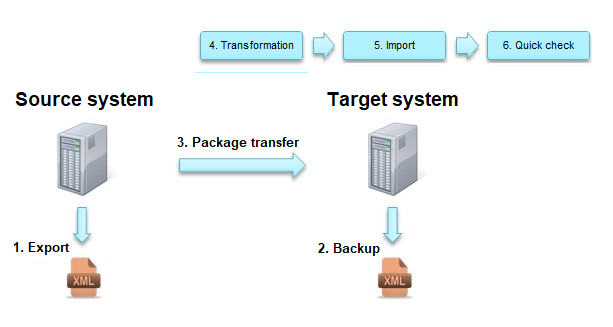
- Export
-
Starting the Export on the Source System
-
Download transport package
Warning:
The data that cannot be transported must be observed. If, for example, you want to transfer your own images, the upload folder must be transported manually.
- Backup
- Perform export (as backup) on the target system
Warning:
If workflows are to be changed or deleted, you must ensure that there are no active workflow items in them. Otherwise, these workflow items cause errors after the import and must be introduced manually into the process. This can be avoided by not deleting plug-ins, but only separating them.
- Package transfer
- Transfer to target system
- Upload to target system
Note:
For standard transports, the option Apply transport package only is always selected. For example, deleting all entities not contained in the import package is applied when restoring a backup.
- Transformation
- Select Entities
- Automatically (by dependencies) check selected entities
- Check the attributes of the relevant content for the environment and edit them if necessary (these can be displayed using the filter in the import dialog)
Note:
In order to transport large processes separately, they should be configured so that no dependencies to common entities are used (e.g. two ticket schemes using the same ticket state).
Workflows and ticket wizards are always transported as a whole (workflow plug-ins or ticket wizard fields cannot be transported individually).
- Import
- Validation and, if necessary, conflict resolution
- Import
- System check
- Perform quick test
Example:
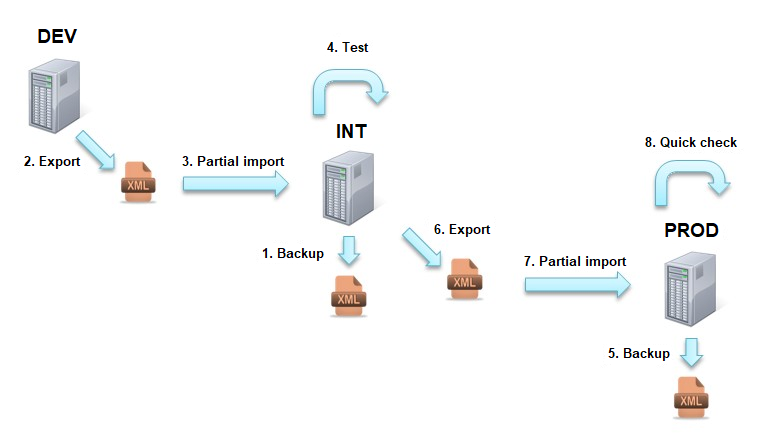
A change is made to the development environment. This is then transferred to the integration environment and tested. Finally, the change is imported into the production environment.


 Copyright (c) 2000-2026 Isonet AG