Shrinking the Log File
In the life cycle of a database, it may happen that the log file becomes so huge that no more further operations can be added to it. For the user of an application, this manifests itself mostly in him not being able to complete any further action, because the data is not written into the database any more.
This can cause considerable problems in the processes of a company. Thus, it is recommended to check the log files of databases on a regular basis.
We will illustrate how to check the size and subsequently shrink the log file manually in the following sections.
Checking the Size of the Log File
Open the MS SQL Management Studio. Expand the Databases node and right click on the database, the size of which you want to check. Select Tasks > Shrink > Files from the context menu.
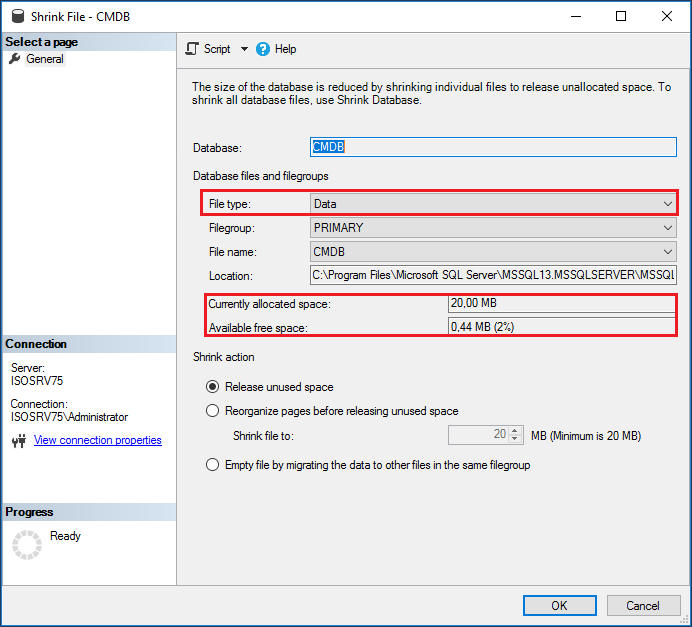
In the dialogue now opening, you can check the size of the database and the disk space left.
Cleansing the Log File in Order to Release Disk Space
Select the designated database and click on the New Query button in the SQL Management Studio.
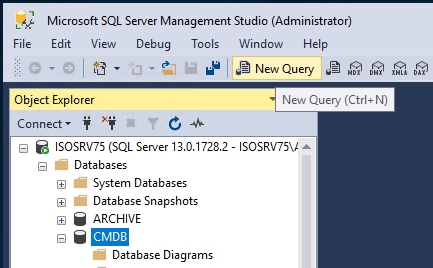
An empty query window opens on the desktop.
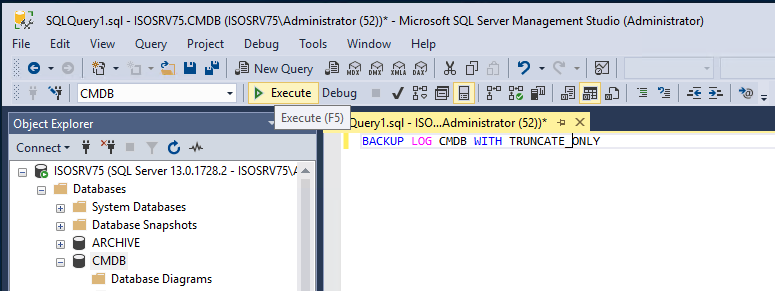
Enter the following:
BACKUP LOG <database name> WITH TRUNCATE_ONLY
with <database name> being the name of the database, whose log file you want to cleanse. Click on the Execute button afterwards or press the F5 key.


 Copyright (c) 2000-2026 Isonet AG