Operators
In conjunction with expressions, operators can be used in order to perform comparisons, apply mathematical operations or connect strings.
An operator is a sign symbolizing a certain function, mainly in the form of an operation. Among these operators are e.g. basic arithmetic operations, relations, and logical operators.
Examples:
< is less than <> does not equal + add/combine
On both sides of the operator, the so-called operands can be found. There is one on the left side of the operator (left hand) and one on the right side (right hand).
In order to process operator functions, it is necessary that both sides have the same data type in most cases. 5 > Hallo, for example, does generally not make any sense. The result of such an operation is of a certain data type as well. Relations like 5 > 4, for example, result in a logical value (True or False). The result data type of an arithmetic operation can, however, consist of several different data types. It depends on the input data types and the arithmetic operation performed.
The tables display an overview of the possible operations with matching examples.
Note:
In order to have easily displayable characters, some operators in the 446 Plattform can differ from the generally known ones. Moreover, there are operators mostly originating in the field of IT.
Using the Operators
Operators can be used for the display of data, for example. This option is available in message templates, workflow actions for users and groups, and for workflow switches depending on such an expression as well.
A short example will demonstrate how operators can be used in a workflow action:
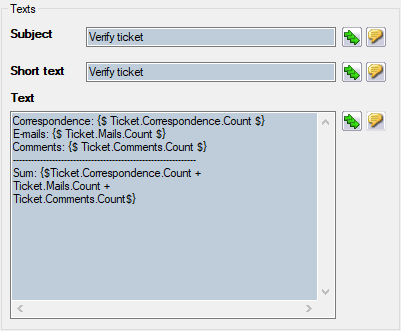
The following data has been entered into the text field in the figure above:
Correspondence: {$ Ticket.Correspondence.Count $}
E-mails: {$ Ticket.Mails.Count $}
Comments: {$ Ticket.Comments.Count $}
---------------------------------------------------------
Sum: {$Ticket.Correspondence.Count + Ticket.Mails.Count + Ticket.Comments.Count$}
In the ticket, this configuration is displayed as follows:
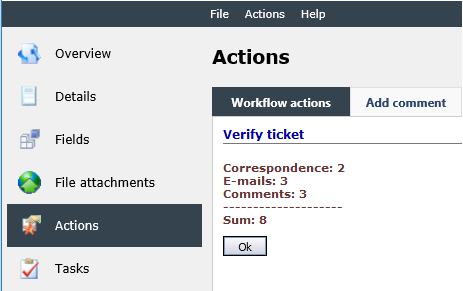
The example shows that when using operators, the start token {$ and the end token $} can only be used at the beginning and at the end of the entire operation. If the expression token is closed after every expression, each expression is processed separately, which will result in no operation.
Relational Operators
Relational operators generally have the result type Boolean (logical value), which can have the following three values:
- True
- False
- Null
These relational operators are often used in switch plug-ins in the workflow. There, tickets can take different directions in the workflow – depending on the expression.
| Operator | Result type | Result |
|---|---|---|
| <= | Boolean | [Left] is less than or equals [right] |
|
Example: Ticket.CreatedDateTime <= Ticket.CompletionDateTime |
||
| <> | Boolean | [Left] does not equal [right] |
|
Example: Ticket.CreatedDateTime <> Ticket.CompletionDateTime |
||
| >= | Boolean | [Left] is greater than or equals [right] |
|
Example: Ticket.CreatedDateTime >= Ticket.CompletionDateTime |
||
| = | Boolean | [Left] equals [right] |
| > | Boolean | [Left] is greater than [right] |
| < | Boolean | [Left] is less than [right] |
Operators for Strings
One part of the operators for strings is their combination. All data types that can be displayed as strings in any way can be combined.
Note:
In one expression chain, only similar operators can be used – thus either && or ||. It is not possible to use && and || simultaneously.
| Operator | Result type | Result |
|---|---|---|
| & | String | [Left] is combined with [right] |
|
Example: Ticket.AffectedUser. |
||
| + | String | [Left] is combined with [right] |
|
Note: Unnecessary characters (e.g. space characters, line breaks etc.) are removed at the beginning and at the end of every of string before combining the strings. Example: Ticket.AffectedUser. |
||
| ~+ | String | [Left] is combined with [right] |
|
Note: Unnecessary characters are not removed when using this operator. Example: Ticket.AffectedUser. |
||
Arithmetic Operators
| Operator | Left hand | Right hand | Result type | Result |
|---|---|---|---|---|
| / | Time |
Double |
Time |
TimeSpan |
|
Note: TimeSpan is a special data type. It denotes the time span between two dates. The result type is converted into the type TimeSpan again here. |
||||
| / | Double |
Double |
Double |
[Left] divided by [Right] |
|
Note: The result type is determined by the more precise data type in this constellation. If the most precise data type is an integer, the result type is an integer as well. If the most precise data type is a double (and thus more precise than an integer), the result type is a double as well. |
||||
| * | Time |
Double |
Time |
TimeSpan |
|
Note: TimeSpan is a special data type. It denotes the time span between two dates. The result type is converted into the type TimeSpan again here. |
||||
| * | Double |
Double |
Double |
[Left] multiplied by [Right] |
|
Note: The result type is determined by the more precise data type in this constellation. If the most precise data type is an integer, the result type is an integer as well. If the most precise data type is a double (and thus more precise than an integer), the result type is a double as well. |
||||
| - | Time |
Time |
Time |
[Right] is subtracted from [left] |
| - | Date |
Time |
Date |
[Right] is subtracted from [left] |
| - | IsoDate |
Time |
Date |
[Left]. |
| - | Double |
Double |
Double |
[Right] is subtracted from [left] |
| + | Double |
Double |
Double |
[Left] and [Right] are added |
|
Note: If the data type of one operand is a string type, the combination is used. Example: Ticket.CustomAttributes. |
||||
| ~+ | Double |
Double |
Double |
[Left] and [Right] are added |
|
Note: If the data type of one operand is a string type, the combination is used. |
||||
Logical Operators
| Operator | Meaning | Result |
|---|---|---|
| && | And | With this operator, two expressions for relations can be combined. |
|
Example: Ticket.AffectedUser. Here, both expressions have to be fulfilled (True) in order to fulfill the combined expression with True. |
||
| || | Or | With this operator, two expressions for relations can be combined. |
|
Example: Ticket.Owner.User. Here, only one of the two sub-expressions has to be fulfilled in order to fulfill the combined expression. |
||
Brackets
When working with expressions, brackets can be used as well. Thus arithmetic operations and complex expressions containing multiple expression conditions can be compiled. The brackets will be interpreted in the same way as is known from mathematics or computer languages.
Example:
((2+3)*4)+1
Result: 21
(Ticket.Fields!MyField1.Text = "1" || Ticket.Fields!MyField2.Text = "2") && Ticket.Fields!MyField3.Text = "3"
The ticket field MyField3 has to have the value 3, here. Moreover, one of the conditions within the brackets has to be fulfilled (thus either the field MyField1 has to have the value 1 or the field MyField2 has to have the value 2).


 Copyright (c) 2000-2026 Isonet AG