Structure
The Service Level Management can be designed as a simple system of rules or as a complex set of rules, which can influence each other as well. In order make the configuration of the SLM module clearer, the individual objects and their modes of operation will be explained in this chapter.
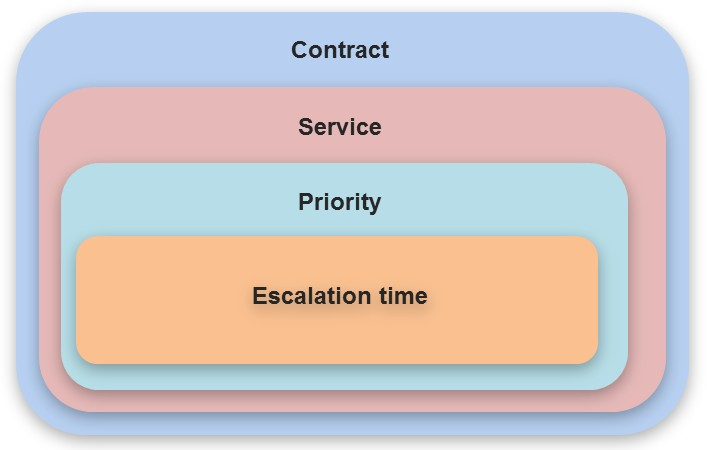
Contract
A contract in the Service Level Management can be equated with a real contract, which has been concluded with a service provider (internal or external). Thus, for every real existing contract, a respective contract can be reproduced and managed.
There is an option to record miscellaneous data for every single contract. Some of this data is optional and not directly relevant for the application or the end user. However, the service times, the beginning, and the end of the contract as well as its validity within the service times are essential and must be specified.
Services
A contract within the Service Level Management can consist of any number of services. These services can differ completely from each other and will be generally recorded in the real contracts in the same way. For example, there are different services defined within a contract for the desktop computers of a support department compared to the servers, on which the customer or other external data is stored.
Priority
Within every service, an arbitrary amount of priorities can be created. Priorities define the gravity of an event that has occurred. When defining the priorities, one should keep in mind that they often can be regarded very subjectively.
Example:
An employee is not able print on his workstation printer any more. Subjectively, this would be a big problem for him and he would set its priority to High. If he, however, has the additional option to use another network printer, the actual priority would have to be regarded as much lower.
Escalation Times
For every defined priority, an arbitrary amount of escalation times can be defined. These times specify, up to which point in time a certain reaction to an occurred event is expected.
Actions in the context of workflows, which will be executed whenever the requirement is not met until the lapse of time, can be linked to these escalation times (e.g. an e-mail sent automatically to the supervisor or a ticket’s reassignment can be configured here).
Example:
For example, the Reaction time is defined as the escalation time. It specifies, how much time is allowed to elapse, until a reaction to a ticket has to occur (e.g. a ticket has to be accepted by the first level support within four hours of its creation).
The first option to solve this problem is to grant the user the right to define the priority of a ticket immediately on ticket creation within the Ticket Wizard himself. This would, however, lead to a subjective prioritization.
In order to automatically assign services and priorities of the SLM instead and thus avoid the subjective perception of priorities by the user, the SLM can be configured to define via coverages, which services and priorities will be applied in certain ticket/user/configuration item constellations automatically.
Coverage
The coverage specifies, which service and priority contained within is to be used as soon as a ticket is created. This coverage can refer to different sections within a ticket.
Example:
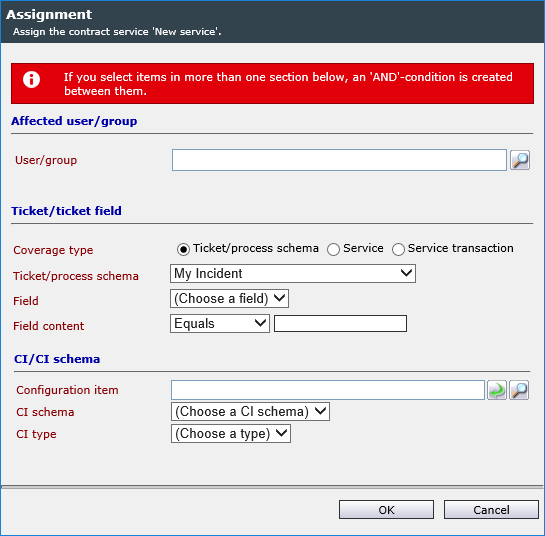
The coverage of the service is only set for the ticket schema My Incident.
The coverage for the service New service is set on the ticket schema gga_Schema and on the entry Producer in the ticket field that allows for categorizing the incident.
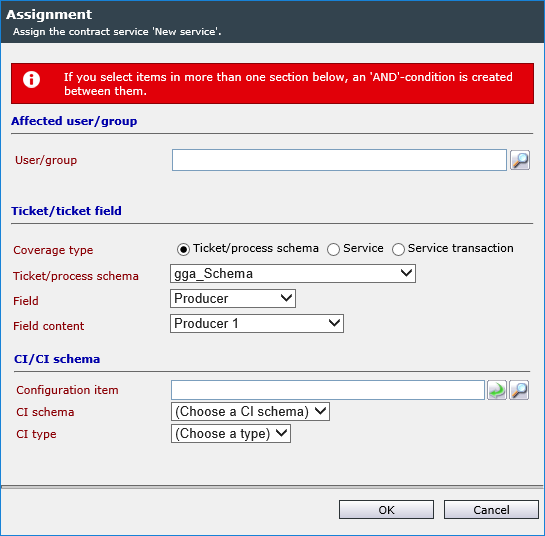
When a ticket is created with this schema, the following will happen:
If the category Producer is selected in the ticket, the service New service will be set automatically. If another category is used in the ticket (which does not have a separate coverage), another service will be used.
Affected User/Affected Group
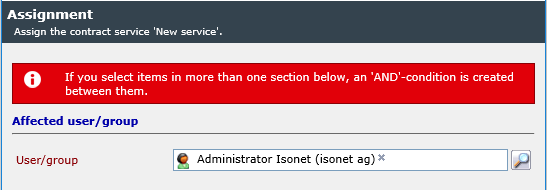
The coverage can be defined on certain users or user groups. For example, there is a user group working on a very important project at the moment. Consequently, this user group can be defined as coverage and as soon as user from this group creates a ticket, the defined priority will be used.
Ticket/Ticket Field
The ticket field coverage has been already illustrated briefly in the previous example. There is an option to define a coverage referring to normal ticket fields here as well.
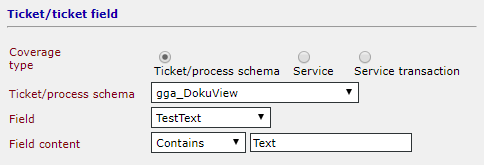
For this purpose, the mode of searching for the specified text within a ticket field can be defined. In the figure above, the search parameter Contains has been selected for a ticket field; e.g. no matter where the specified word can be found in the field, this coverage will be used. If ticket fields are prefilled via a list, it possible to use values defined in the list instead of individual, freely-definable words. If the Service Portfolio is activated, process schemas, services, and service transactions can additionally be defined for a coverage here
CI/CI schema
Here, a configuration item (CI) can be used as a coverage area. A CI schema can be selected with or without the additional delimitation of a CI type. When the ticket is created and linked to a CI of the selected type or schema (during creation), the coverage will be applied.

A certain CI can be used for the coverage as well. Then, the coverage will only be used, if exactly this selected CI has been linked to the ticket (during creation).
SLA Assignment Outside of the SLM
An SLA can be assigned outside of the Service Level Management as well. For this purpose, nearly all objects have a tab referring to the SLM. The available assignment options are different for every object. For example, only a priority can be assigned in a ticket schema. In a CI, on the other hand, it suffices to define a service, the assignment to a priority is not obligatory. It depends on how limited the selection of the SLA is supposed to be during ticket creation.
The assignments performed outside of the SLM will, however, still be visible in the SLM and can be managed there.
CMDB
CI
In a configuration item, an assignment to a service or a priority can be performed on the SLA tab. The priority is optional here. However, a contract has to be set for an expense additionally; for a priority, a contract as well as an expense is required.
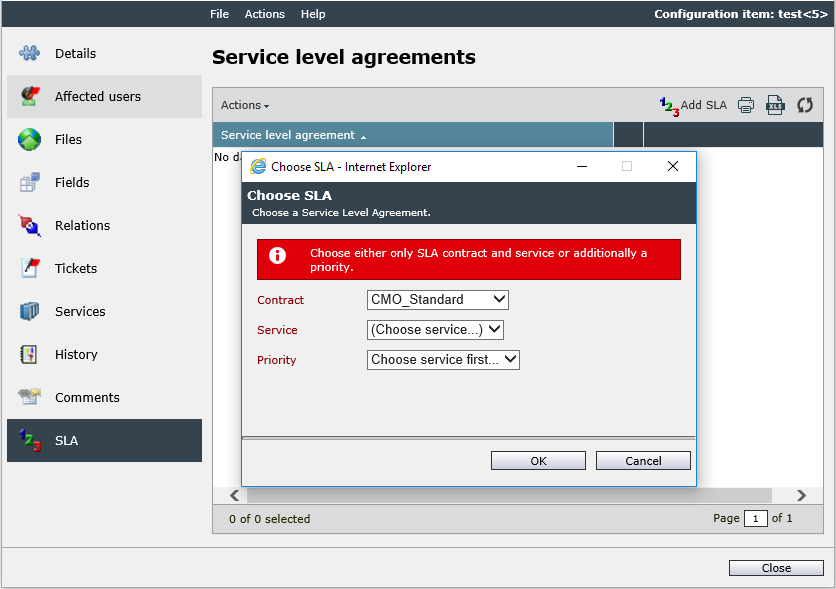
As soon as a ticket is created, which is then linked to this CI (during creation), the service and/or priority specified here will be used for the ticket.
CI schema
The assignment of a service or a priority can be also performed on a CI schema in the CMDB configuration. It is not necessary to specify it down to the priority level here as well; the assignment of a service will suffice.
When a ticket is created, which is linked to a CI of the respective CI schema, the SLA configured here will be used. Thus, it is possible to link all the CIs of a schema to an SLA, so that not every single CI has to be edited individually.
Ticket Management
In the configuration dialogue of a ticket schema, a tab named SLM Priorities can be found as well. The name already hints at the fact that here - in contrast to other objects – a specific priority has to be defined. The definition of a service does not suffice.
Whenever a ticket is created that cannot be assigned with a service and a priority definitively, a fallback mechanism will be applied. For this, the last ten tickets matching the priorities in question will be consulted. The coverage used most frequently for these ten tickets will then be used for the new ticket as well. Thus, the creation of tickets without a priority due to a lack of distinct assignment will be avoided.


 Copyright (c) 2000-2026 Isonet AG