Configuration
The basic configurations for the Service Portfolio can be made in the settings, where the statuses and life cycles of the individual portfolio elements are configured and where schemas for the later use in services can be created.
Life Cycles and Statuses
The life cycle configuration of the Service Portfolio can be found under Settings > Service Portfolio > Service Life Cycles.
By clicking the button New life cycle top right various life cycles for service catalogs, services, and service transactions can be created. Life cycles that are no longer required can be deleted via the Actions menu on the left.
Note:
An efficient Service Portfolio can only be achieved if at least one life cycle exists for each life cycle type (service catalog, service and service transaction).
Creating Life Cycles
New life cycles are created by clicking New life cycle. Subsequently, a new dialogue window opens to enter all relevant information for the new life cycle. Until the first saving only the Details tab will be available to enter the following information:
Name: Defines the significant name of the life cycle. If multiple languages are activated in the system, a localized name can be entered.
Description: Provides a significant description for the life cycle in all available languages here.
Type: Defines the designated life cycle type (Service catalog, Service or Service transaction).
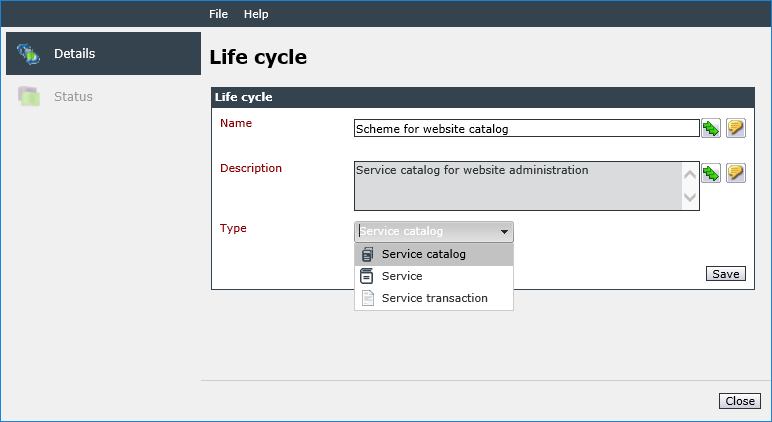
After a click on Save, the Status tab will be available to configure the various statuses of the life cycle. The first created status will become the start status automatically. Every service catalog, service, or service transaction this life cycle has been created for will begin with this status.
Moreover, the following settings can be made for the respective status in the corresponding dialogue window:
Details
Name: Defines the name of the status. If multiple languages are activated in the system, the name can be localized.
Description: Provides a significant description for the status in all available languages.
Icon: An icon can be selected for the status in order to facilitate the clarity. Either preset icons on the server can be used or own icons can be uploaded from the local computer.
Status type: There are three preset status types (In operation, In pipeline and Archived) a new status can be assigned to.
Note:
In order to use a life cycle productively it is necessary to use each status type for the existing statuses.
Standard status: This checkbox will be disabled and checked automatically for the first status created. If another status of this type will be created, it can be defined as the default status for the selected type by checking the box.
Tip:
The standard status will be needed for the automatic inheritance of statuses.
Note:
If a status is set as a standard status, it cannot be deleted. First another status has to be created or an existing one set as the standard status for the old standard status to be deleted.
Show icon in the stage: If this checkbox is activated, the previously selected icon will be displayed on the start page of the Service Portfolio for every element in this status.
Start status: If this checkbox is activated, the current status will become the start status. If the status is the first one created, it will become the start status automatically. However, this can be changed as soon as further statuses have been be added.
After having entered all of the designated information, the status is created by clicking Save. Subsequently, the tab Reachable Statuses will become available. It can be ignored until all necessary statuses for the life cycle have been created. If all necessary statuses are created, they can be opened one after another and modified by switching to the Reachable statuses tab and by clicking on New reachable status.
Reachable statuses
In the dialogue window the following configuration options are available:
Reachable status: Defines a reachable status from the current life cycle.
Workflow: This workflow is triggered as soon as the status changes from the current status to the reachable status.
Tip:
Service catalogs as well as services and service transactions require special workflows.
Automatic transition: If this checkbox is activated, status changes can be made automatically after a certain time span. As soon as the checkbox is activated, this time span can be entered directly below. If the time span is surpassed, the status will be changed to the specified status automatically.
If a reachable status is not required anymore, it can be deleted in the Actions menu.
After the details and status dependencies have been defined for a life cycle, all further necessary life cycles can be created and configured for the Service Portfolio.
Service Schemas
Via a service schema, a prefabricated set of dynamic fields can be passed on to a service later on. If further information that exceeds the name, description and file attachments has to be entered for a service, this can enabled in a service schema.
Service schemas can be managed via Settings > Service Portfolio > Service Schemas.
New service schemas are created by clicking on the respective button in the top right corner. In the subsequently appearing dialogue, the name and description for the schema can be entered.

After saving the schema, the tab Dynamic fields will be available where any number of dynamic fields can be added. If the respective dynamic field is mandatory for each service that uses this schema, the checkbox Required needs to be activated.
After clicking on Save this schema can only be selected for every recently created service in the Service Portfolio.
Warning:
When modifying the settings of a service, please note that changing the service schema in a service is not possible anymore.


 Copyright (c) 2000-2026 Isonet AG