User Management
| Icon | Description |
|---|---|
|
Authentication 
Old icon: |
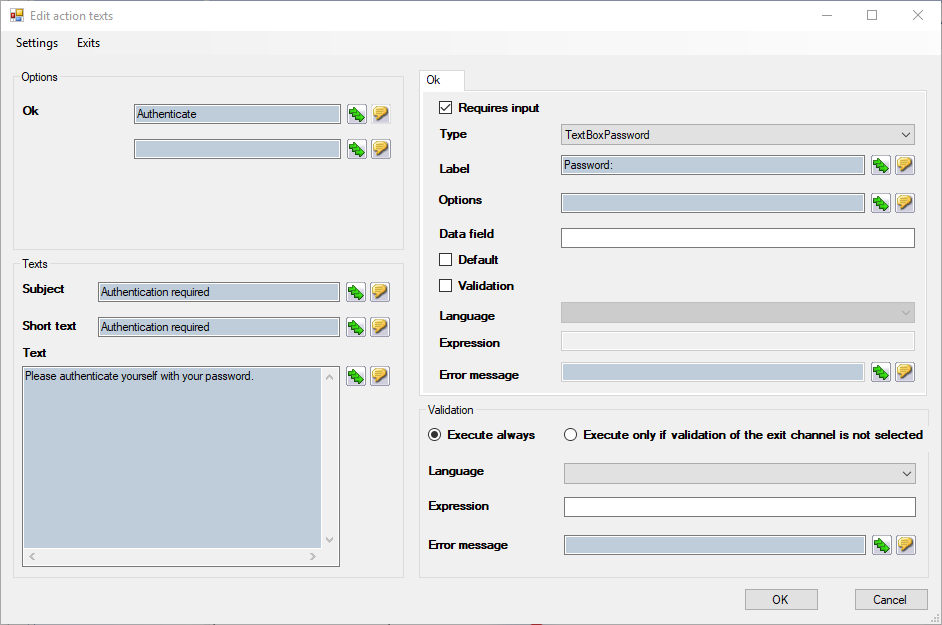
This plug-in authenticates a user. The user’s password is required here (the password will not be saved). This plug-in combines the user authentication with a ticket workflow action. Moreover, a hash can be computed and its result written into a ticket field. Thus, it is possible to check whether certain ticket field values have changed, for example, without making the actual field content visible. Configuration
OK: Defines the text of the OK button in the corresponding ticket workflow action. Subject/Short text: Defines the displayed texts in the corresponding ticket workflow action. Additionally, the following options can be configured via the context menu: Hash Expression: An expression that reads out values to be used for calculating the hash value can be specified here. Language: Defines the language to be used when parsing expressions. TicketSchemaField Note: If no hash expression or no valid GUID is specified for a ticket field, no hash value is generated. |
|
Create user 
Old icon: |
This plug-in attempts to create a new user. It has two outputs: User successfully created and User already exists. Configuration Group: The group the new user is to be created in is specified here. Either groups that are in a certain relation to the workflow item (e.g. the responsible group) or predefined and preconfigured groups can be entered here. Login name: Enter an expression to read out the login name from a data or ticket field, for example. Data field to store the user ID: A data field of the workflow item the new login name is stored in is specified here. |
|
Set user field 
Old icon: |
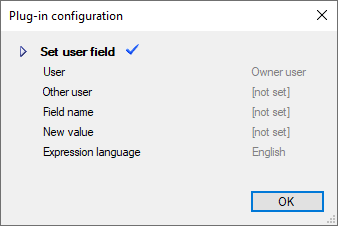
This plug-in allows for changing data fields of a user. Configuration
User: The user whose data is to be changed is specified here. You can select the following users who have a particular relationship to the workflow item (for example, the Responsible user). If the Other User (separate field) option is selected, the user is read from the Other User option.
Other user: A text field in which a static GUID, login name, or expression can be entered. If an option is selected in the list of users (except Other user (separate field), the Other user command is not used. Field name: Contains the data field to be changed. Possible values are: lastname, firstname, e-mail, phonedirect, phonemobile, phoneprivate, fax. Alternatively, an expression can be used here. New value: The new value to be assigned to the data field is specified here. Alternatively, an expression to read out a data field can be used here. Expression language: Defines the language to be used for parsing the expressions. |
|
Split per user 
Old icon: |
This plug-in allows for splitting up a workflow item into several workflow items. The workflow items are created, whereupon the owner of the workflow item is reset based on a character string including user identifiers and separators. The plug-in has two outputs: one for the main object and one for a workflow item per user. Configuration Splittable user identifier string:Here, either a static list with user names can be specified, an expression used, or a ticket/data field referenced. These three options can be combined as well. Example: user1$user2$user3: Fixed user list. If a user does not exist, no workflow item will be created for this user. { $ MyDataFieldWith { $ Ticket.Fields!FieldWith Note: It is necessary to use the value property of the field and not the text property here. Separator: The default separator is the dollar sign ($). Although it is possible to use other separators, this is not advisable as soon as expressions are used or ticket/data fields with user browser data are referenced, as user browser data use the dollar sign as a separator, for example. Note: Do not forget to rejoin the workflow items later on or to remove the duplicates. |
|
User field to ticket field assignment 
Old icon: |
This plug-in allows for writing user data into ticket fields and the other way round. Configuration Xml-Mapping: Specifies an XML that contains the data mapping. User: Specifies the name of the user whose data are to be read or changed. Either users in a certain relation to the workflow item (e.g. the responsible user) or defined, previously configured users can be set here. Get user from ticket field: The GUID of a ticket field containing a user is specified here. Multiple GUIDs (from different ticket schemas) are separated by commas. Example: The XML for the option Xml-Mapping could look as follows: <Assignments direction=
</Assignments> The following values are valid for the direction attribute:
The attribute TicketSchemeField contains the GUID of a ticket field. Examples for CustomAttributes:
Further CustomAttributes can be added any time, and thus this list should not be considered exhaustive. |





 Copyright (c) 2000-2026 Isonet AG