Task Management
| Icon | Description |
|---|---|
|
Create Decision Task Activity 
Old icon: |
These plug-ins force a ticket workflow item to wait in the respective plug-in until a task has reached a certain status. Afterwards, a task activity is created and the ticket workflow item leaves the plug-in. Configuration These plug-ins are configured in the same way as the plug-in Create Task Activity. The difference is the number of outputs. Every output is assigned with a status (e.g. Output A = Closed, Output B = In Progress). If a workflow item is waiting in the plug-in and the corresponding task reaches the status Closed, it will use the output A. If the tasks reaches the status In Progress first, the workflow item will use the output B. Up to 2 different outputs are possible. |
|
Create Decision Task Activity 3 
Old icon: |
These plug-ins force a ticket workflow item to wait in the respective plug-in until a task has reached a certain status. Afterwards, a task activity is created and the ticket workflow item leaves the plug-in. Configuration These plug-ins are configured in the same way as the plug-in Create Task Activity. The difference is the number of outputs. Every output is assigned with a status (e.g. Output A = Closed, Output B = In Progress). If a workflow item is waiting in the plug-in and the corresponding task reaches the status Closed, it will use the output A. If the tasks reaches the status In Progress first, the workflow item will use the output B. Up to 3 different outputs are possible. |
|
Create Decision Task Activity 4 
Old icon: |
These plug-ins force a ticket workflow item to wait in the respective plug-in until a task has reached a certain status. Afterwards, a task activity is created and the ticket workflow item leaves the plug-in. Configuration These plug-ins are configured in the same way as the plug-in Create Task Activity. The difference is the number of outputs. Every output is assigned with a status (e.g. Output A = Closed, Output B = In Progress). If a workflow item is waiting in the plug-in and the corresponding task reaches the status Closed, it will use the output A. If the tasks reaches the status In Progress first, the workflow item will use the output B. Up to 4 different outputs are possible. |
|
Create Decision Task Activity 5 
Old icon: |
These plug-ins force a ticket workflow item to wait in the respective plug-in until a task has reached a certain status. Afterwards, a task activity is created and the ticket workflow item leaves the plug-in. Configuration These plug-ins are configured in the same way as the plug-in Create Task Activity. The difference is the number of outputs. Every output is assigned with a status (e.g. Output A = Closed, Output B = In Progress). If a workflow item is waiting in the plug-in and the corresponding task reaches the status Closed, it will use the output A. If the tasks reaches the status In Progress first, the workflow item will use the output B. Up to 5 different outputs are possible. |
|
Create Decision Task Activity 6 
Old icon: |
These plug-ins force a ticket workflow item to wait in the respective plug-in until a task has reached a certain status. Afterwards, a task activity is created and the ticket workflow item leaves the plug-in. Configuration These plug-ins are configured in the same way as the plug-in Create Task Activity. The difference is the number of outputs. Every output is assigned with a status (e.g. Output A = Closed, Output B = In Progress). If a workflow item is waiting in the plug-in and the corresponding task reaches the status Closed, it will use the output A. If the tasks reaches the status In Progress first, the workflow item will use the output B. Up to 6 different outputs are possible. |
|
Create Task 
Old icon: |
This plug-in creates a new task as soon as a workflow item is passing through it. Configuration Task Title: Defines the title of the task. If no static title is to be used, expressions can be used as well (e.g. to read out a data field of the workflow item). Task Description: A description of the task can be entered here. If no static description is to be used, expressions can be used as well (e.g. to read out a data field of the workflow item). Task Schema: The desired schema of the task has to be selected here. Start: Defines the offset time of the task (e.g. 2.75: the task activity will start in 2 hours and 45 minutes). As an alternative, an expression that extracts the offset time from a data field of the workflow item can be specified here. End: The end of the task as a number. This value is added to the offset time. If the field is left empty, the end of the task corresponds to its start (e.g. if 5.5 is entered here, 5 hours and 30 minutes will be added to the offset time). As an alternative, an expression that extracts the end time from a data field of the workflow item can be specified here. Executor: Defines the user to be set as the executor of the task. Five predefined options are available here. Process role: This entry is optional, even if the ticket passing through the workflow comes from a process schema. TicketSchemaFieldObjectGuid which contains e-Mail Address, UserObjectGuid, or Login Name: This value is important, whenever the executor is to be read out of a ticket field. A ticket field containing some of the required information (e-mail address, UserObjectGUID, or login name) is to be specified here. The matching user is then selected via the Security Manager and assigned with the task. Validation expression: An expression that returns Boolean values can be specified here. |
|
Create Task Activity 
Old icon: |
This plug-in forces a ticket workflow item to wait in the respective plug-in until a task has reached a certain status. Afterwards, a task activity is created and the ticket workflow item leaves the plug-in. Configuration The configuration of the options is similar to the plug-in Create Task. |
|
Status change
Old icon: |
|
|
Task assignment
Old icon: |
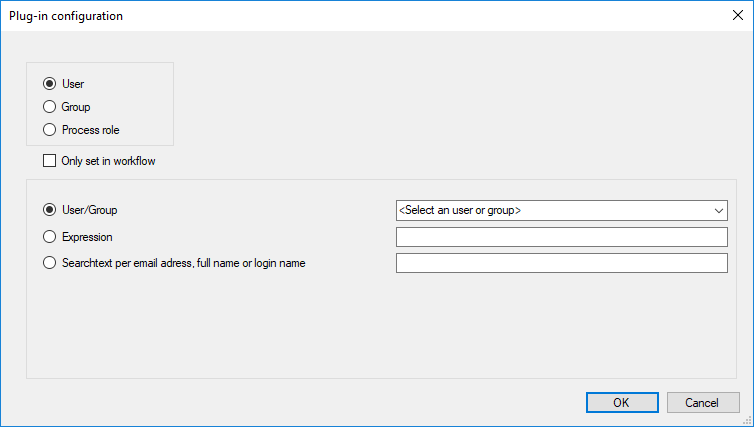
This plug-in assigns tasks to a user, group or process role. Configuration
The following settings are available for the User and Group options:
Only the process template and process role can be defined for the Process role option. Only set in workflow: If activated, the assignment is only made for the workflow item and not for the task. |
|
Ticket user assignment by expression
Old icon: |
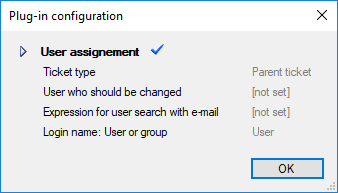
A user or group can be changed in the ticket. Configuration
Ticket type: The parent ticket or successor tickets can be selected. User who should be changed: The user object of a ticket to be changed (creator, owner, affected user, or responsible) can be selected here. Expression for user search with e-mail address, UserObjectGuid or login name: Contains the user or group expression. The expression has to return either an e-mail address, an ObjectGUID, or a login name here. Login name: User or group: Defines whether the ticket is to be assigned to a group or user. If, for any reason, the user or group cannot be assigned, the ticket can leave the plug-in through an error output. |
|
Wait for tasks 
Old icon: |
When a ticket runs through this plug-in, it will be paused until all tasks linked to it have reached the status Closed. |









 Copyright (c) 2000-2026 Isonet AG