Container and Successor
| Icon | Description |
|---|---|
|
Container child ticket extraction 
Old icon: |
This plug-in extracts the workflow item of a ticket passing through it from a container. Afterwards, the ticket will be available as a completely independent object again. This action can be necessary, if tickets are not to remain in a container due to certain decisions in the workflow, for example. This plug-in can only be used in connection with the plug-ins Container ticket split-up and Container ticket join. This plug-in has an error output. This is triggered if an error occurs during the ticket extraction process. |
|
Container ticket join 
Old icon: |
This plug-in reverts the Container ticket split-up. Afterwards, the workflow will be passed through by the entire container again. Whenever the plug-in Container ticket split-up has been used, the Container ticket join plug-in must to be used to cancel it. |
|
Container ticket split-up 
Old icon: |
This plug-in makes sure that every ticket in a container will pass through the following plug-ins in a workflow. This applies to all following plug-ins until this split-up is canceled via the Container ticket join plug-in. The example described for the plug-in Container child ticket extraction applies here as well. Before processing the individual tickets in this container, the status of the entire container can be set to In Process, for example. As there are only similar tickets in a container, all tickets will be edited as soon as one of them is edited. In order to be able to edit only an individual ticket (or to modify a field in this ticket), the tickets in the container have to be split up into separate workflow items. |
|
Create items for successor tickets 
Old icon: |
This plug-in can be used whenever there are still pending activities left to be performed for already closed successor tickets. Example: When the parent ticket (the ticket used as the basis for the successor tickets) is still in the workflow and arrives at a point, at which there is still an e-mail to be sent for the created and already closed successor tickets, this plug-in can be used for creating temporary workflow items for the successor tickets. Subsequently, they will be forwarded to the Send Message plug-in and then to an output in order to be eliminated again. The plug-in has two outputs. The parent ticket leaves the plug-in through the normal general output and the new items for the successor tickets leave the output through the output for successor tickets. |
|
Create successor tickets 
Old icon: |
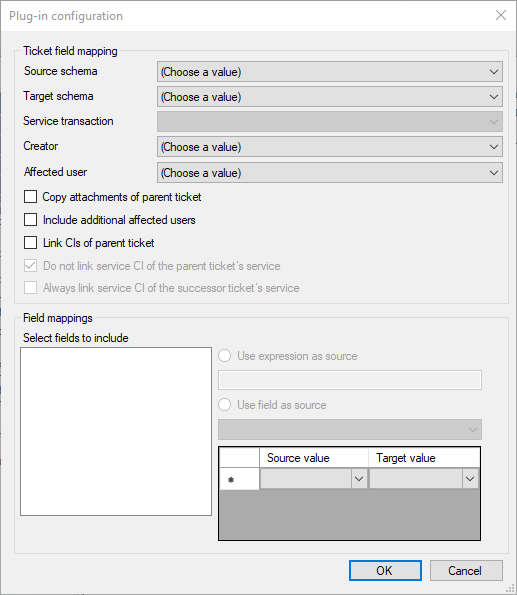
This plug-in automatically creates a successor ticket. The ticket schema and the user roles can be selected, and a field mapping can be created for the ticket fields. Furthermore, expressions can be used for filling the ticket fields. This plug-in has an error output. It will be used whenever an error occurs during the creation of the successor ticket and the ticket cannot not be created. Configuration
Ticket field mapping Source schema: Select the ticket schema to serve as the source for the ticket fields. Target schema: Select the target schema the successor ticket is to be based on. Service transaction:If the target schema is a process schema, select the service transaction the successor ticket is to be created with here. Creator: Select a creator for the successor ticket. Affected user: Select an affected user for the successor ticket. Copy attachments of parent ticket: If this option is activated, file attachments of the ticket running through this plug-in are copied and attached to the newly created successor ticket. Disabled file attachments are not included. Link CIs of parent ticket: The CIs of the ticket, whose workflow item is currently running through this plug-in, will be linked to the new ticket. Do not link service CI of the parent ticket’s service: The service CI of the service used for creating the ticket, whose workflow item is currently running through this plug-in, will not be linked to the new ticket. (Only for tickets created via the Service Portfolio.) Always link service CI of the successor ticket’s service: The service CI of a service used for creating the successor ticket is always linked to the new ticket. (Only for tickets created via the Service Portfolio.) Field Mappings Select fields to include: After selecting the target schema, all its available fields will be displayed here and can be selected. The fields are referenced via their ObjectGUID. Use expression as source/Use field as source: Here, either an expression can be entered or a field mapping between fields of the source schema and the target schema created. If there are default values, e.g. in case of drop-down lists, a source and target value can be defined.
Note: The parent ticket must have a status and an owner for this plug-in to work. |
|
Move parent workflow item 
Old icon: |
This plug-in is used if the successor ticket has to ensure that the parent ticket is closed. It moves all items of the main ticket. Example: In a successor ticket, the permission for a request placed in the main ticket is applied for. This request is declined in the successor ticket, which results in closing the successor ticket and the parent ticket. However, other tasks or actions can be executed after moving the workflow item. The parent ticket is only moved to another position in the workflow. The plug-in has two outputs. Output is used by the successor ticket and the Move parent to output is used by the parent ticket. |
|
Status change of all successor tickets 
Old icon: |
This plug-in changes the status of all successor tickets that have been created on the basis of the ticket currently passing through the plug-in. Configuration Status: A status to be set in the successor ticket can be selected from the available statuses. Status out of data field X: A field name containing a valid status can be entered here. |
|
Status change origin ticket 
Old icon: |
This plug-in changes the status of a ticket (origin ticket), on whose basis the successor ticket currently running through the plug-in has been created. Configuration State: A status to be set in the origin ticket has to be selected from the available statuses. Status out of data field X: A field name containing a valid status can be specified here. Expected current status: This option depends on the value in the Expected exact number of open successor tickets field. This field is a required field if a value has been entered there. Expected exact number of open successor tickets: Optional. If a number is passed, the number of successor tickets to the origin ticket that have the status Expected current status has to match this number. Otherwise, the status of the origin ticket will not be changed. Recognition sign for closed successor tickets: Optional. If a status is selected, the status of the origin ticket will not be changed if it has the configured status (e.g. in order to avoid a closed origin ticket being reopened again). |
|
Wait for other tickets 
Old icon: |
This plug-in enables workflow items of a ticket to wait for either successor tickets, origin tickets, or linked tickets until they have reached a certain status. Note: This plug-in requires the Wait > Resume plug-in. Example: A ticket is created based on a certain problem. This ticket is linked to another ticket containing a similar problem and can only be processed after the other ticket has been processed. This plug-in can be used for such a purpose. Configuration Check parent ticket: Defines that the origin tickets of a ticket, whose workflow item is waiting in the plug-in, are to be checked. Check successor tickets: Defines that the successor tickets of a ticket, whose workflow item is waiting in the plug-in, are to be checked. Check linked tickets: Defines that the tickets linked to the ticket, whose workflow item is waiting in the plug-in, are to be checked. Status list: In this list, all statuses to be reached by the origin, successor, or linked tickets for the workflow item to be resumed are stored. Ticket schemas: This list is optional. The ticket schemas the status list is to be applied to can be entered here. If there are no entries in this list, all ticket schemas will be checked. |
|
Wait -> resume 
Old icon: |
Whenever the plug-in Wait for other tickets is used, this plug-in has to be used for removing the workflow items of the waiting tickets from this queue, if they are not removed from there by the regular workflow. Example: This can happen, if the parent ticket (the successor tickets are in a queue) is closed early due to a certain reason (e.g. if the execution of a change has not been permitted etc.). In this case, the successor tickets have to be resumed as they would remain in the queue indefinitely otherwise. When a workflow item passes through this plug-in, all tickets related to its ticket (including parent tickets and successor tickets as well as linked tickets) that are in a waiting plug-in are searched. |




 Copyright (c) 2000-2026 Isonet AG