Background processes
The Background processes (formerly Worker Management) are accessible through Settings > Administration > Background processes.
Here, an overview of all existing workers executed on the system is displayed. The individual workers necessary for the operation of the individual modules can be (re-)started and stopped here.
Tip:
There is a larger number of workers who are not needed on every system. To prevent a misconfiguration, individual workers can not be added or removed from this page.
The installation is done by copying the entire directory of the worker from ..\Isonet\Agent\InactiveWorkers according to ..\Isonet\Agent\Workers. Uninstallation is achieved by deleting the directory.
Warning:
The installation or uninstallation of a worker is only to be carried out after consultation with the administrator or support. Improper execution can lead to damage to the system.

By clicking on the corresponding worker, a tab panel appears with the tabs Details and Properties. Here you can check and change various settings. The corresponding values can be obtained from the support. 
In the upper part of each tab, under a general description, there are three buttons to Pause, Stop and Test the worker. According to the selected action, the alternative operation (e.g. Pause -> Continue) appears. Using the Test button, the currently selected worker can be tested for functionality without having to start it. Information about the test result is then displayed.
Note:
Not all workers support the Test and Pause functionality.
Tab Details
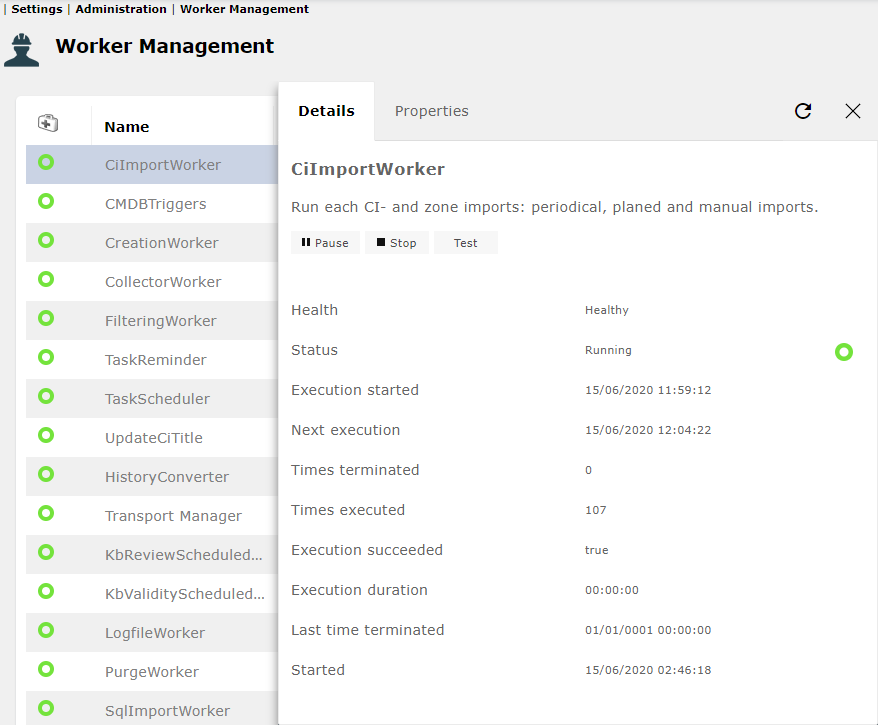
The Detail tab lists the status and various statistical information about the execution of the worker.
Tab Properties
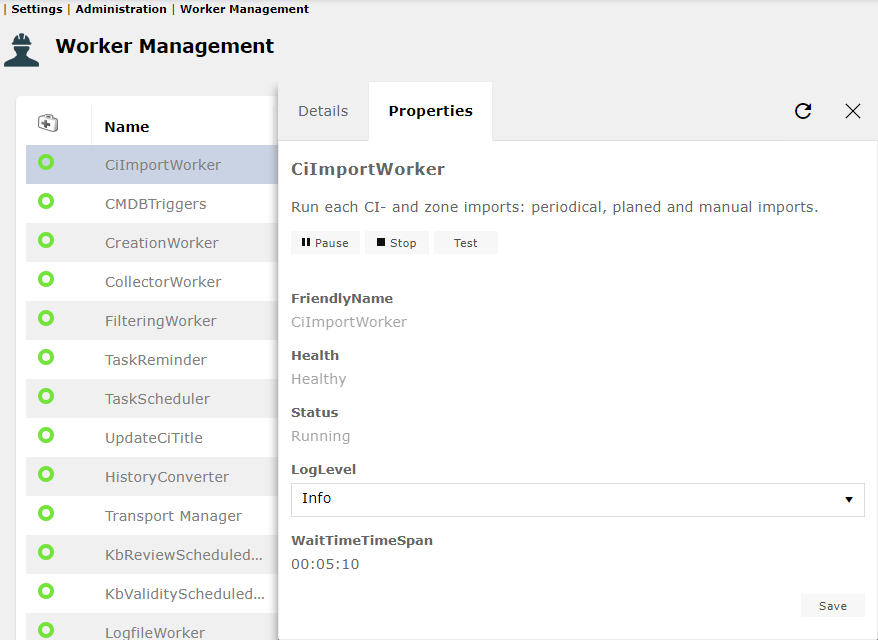
The property tab displays general information such as the name and description of the worker and various diagnostic values.
The Log Level can be selected from the following levels and saved:
- Fatal
- Error
- Warning
- Info
- Verbose
- Debug
Tab Schedule
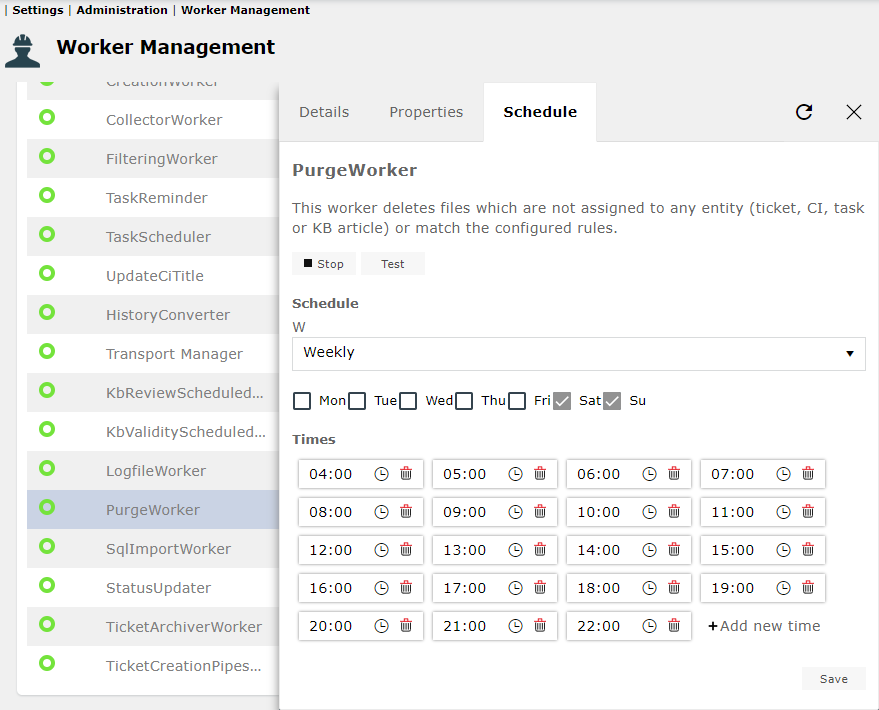
For some workers, execution can be configured with a schedule. The period can be set as follows:
Weekly: Weekdays and times can be specified.
Interval: The duration (date from ... to) and the frequency (seconds, minutes, hours, days) are adjustable.
| Directory | Worker name | Description |
|---|---|---|
| CIImporter | CiImportWorker | Run each CI- and zone imports: periodical, planed and manual imports. |
| CMDBTriggers | CMDBTriggers | This worker triggers a workflow for a configuration item. This occurs as soon as a date stored in a CI data field is reached. |
| CreationWorker | CreationWorker | This worker runs as an interval. In each work interval it searches for entities (objects) to be created and creates them. |
| CsvToTicketImporter | CsvToTicketImporter | This worker imports and updates tickets. The data must be in a csv file (see also Information about the CsvToTicketImporter). |
| Customized. |
LverExportToCsv | Customer-specific worker: Exports activity allocations with associated ticket and CI data to a csv file. Uses customer-specific ticket and CI fields. |
| EventWorkflow |
MoveTicketsTo (Based on a SQL Statement) |
This worker moves tickets that do not have a certain status to a definable workflow. The shift is performed at a specified interval. |
| ExcelExporter | ExcelExporter | Exports the data and attributes of persons or groups (Principal) to an Excel file. This is zipped and then sent to a defined e-mail address. |
| ExcelImport | ExcelImport |
Import one or more excel sheet on a defined SQL table. |
| Isonet.EventManagement. |
CollectorWorker | This worker is part of Event Management. It creates tickets from the filtered events (according to the defined ticket mappings). |
| Isonet.EventManagement. |
FilteringWorker | This worker is part of Event Management. He is responsible for filtering the events received according to the rules created. |
| Isonet.Knowledgebase. |
KbExportWorker | This worker exports KB articles (automatically in a configurable time interval) to text files (HTML or XML). The categories to be exported are marked as Included (or Included recursively). Templates can be configured to define what is exported. |
| Isonet.TaskManagement. |
TaskReminder | Starts a workflow configured in the task schema once for all tasks whose end date has been reached (task schema configuration: reminder workflow). This worker works regularly at a configurable interval. |
| Isonet.TaskManagement. |
TaskScheduler | Starts a configured workflow for all tasks for which a schedule has been saved. The task status is set to the status configured in the schedule and the next execution time is saved. This worker works regularly at a configurable interval. |
| Isonet.TransportManager | Transport Manager | Executes exports and imports when using the Transport Manager. No configuration is necessary.  |
| Isonet.Workers.Cmdb. |
UpdateCiTitle |
Sets the CI title for those CIs that were changed since last run. In properties tab you are able to choose whether child CIs should also be updated or not by writing True or False (default value) in the input box and confirms by hitting Save.
Note: To display the titles in the display field in a CI browser, the Title column must be contained in the DataView CI browser. |
| Isonet.Workers. |
HistoryConverter |
Converts the history entries of tickets, CIs, tasks and KB articles to the new format. Each converted entry is marked with a 1 in the Converted column of the HistoryEntries table. All entries that have a 2 were considered invalid by the converter and ignored. A 3 means that an unexpected error occurred during the conversion (check!) All rows with NULL in this column are either not yet converted or do not belong to any entity. |
| KbReview |
KbReview |
Verified the review date from the KB article and change the article after the configuration in the template. |
| KbValidity |
KbValidity |
Verified the validity date from the KB article and change the expiration article after the configuration in the template. |
| LogfileScheduled |
LogfileWorker | Delete all log files older than the defined date. The defined date includes all log files whose age when the worker is executed is greater than the defined value of the worker parameter MaxFileAge (in days). |
| MoveEntitiesTo |
MoveEntitiesTo |
Moves objects (Expenses, Tickets, CIs, Knowledge Base articles or users/groups) based on SQL queries into a defined event workflow. This movement can be performed in an interval (entities per minute). It is also possible to specify data fields for each item created. |
| PurgeWorker | PurgeWorker |
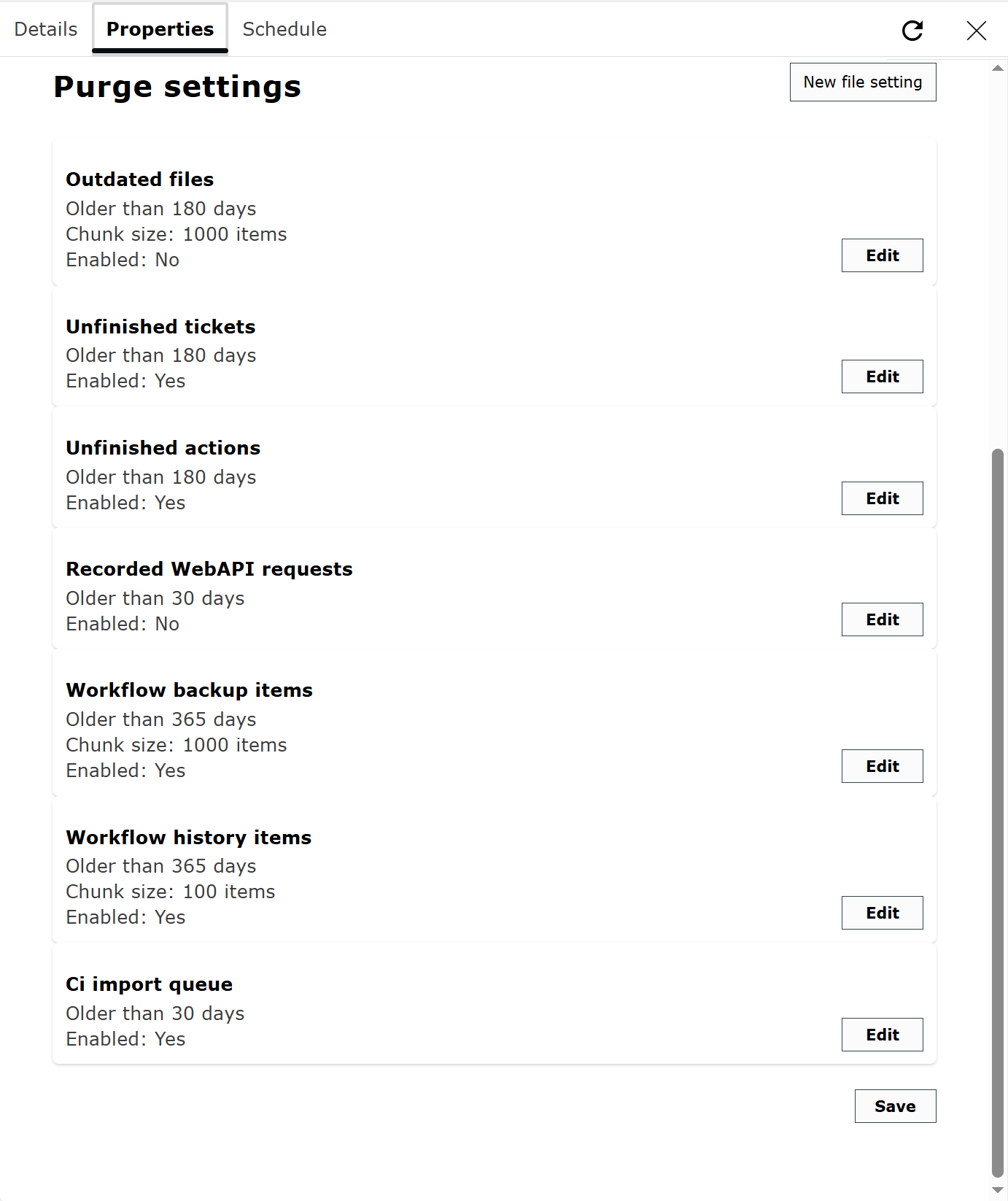
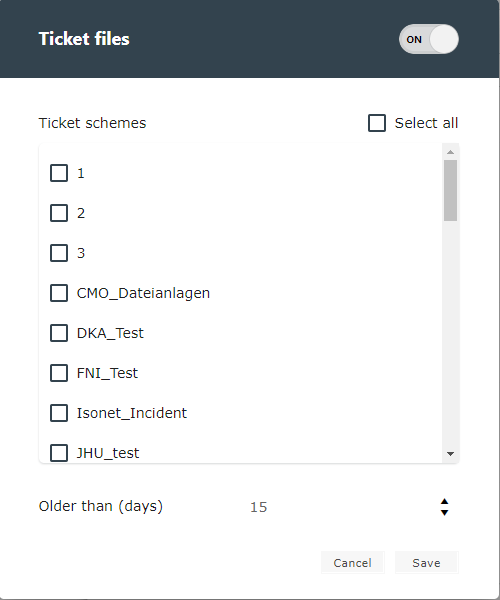
This worker deletes files that are not assigned to an entity (ticket, CI, task or KB article) or do not comply with the configured rules. It also cleans up the database by removing actions that are not fully configured (e.g., ticket actions or CI actions) and the CI import queue. Specific configurations:
On the Properties tab, additional settings for file cleanup can be made:
|
| SecuritySqlImport | SqlImportWorker | This worker exports users and groups from a database and prepares them for import into the 446 Plattform®. |
| ServiceCatalog |
ServiceImporter | Imports services that do not yet exist in the service portfolio. Existing services are not updated. Deleted services are removed. If tickets have already been created for a service to be deleted, the service is archived. |
| ServiceNow |
ServiceNow |
This worker fetches tickets from the SeviceNow REST API and creates local tickets. It supports file attachments and has a special configuration to chain comments in specific ticket fields. It is able to detect tickets that have already been created and update them. The update is not done directly in the ticket fields, but a workflow item is started in a workflow that contains a data field for each assigned value from the ServiceNow ticket. If the worker searches for existing local tickets for a specified external ticket number, it orders the results by status group:
Within these statuses, the secondary order Newest first is applied. |
| ServicePortfolio |
StatusUpdater | Starts and ends service portfolio entities:
This worker works regularly at a configurable interval. |
| SqlToCsvExport | SqlToCsvExport | Exports the result of an SQL query to a CSV file in UTF-8 format. Configuration settings:
All configuration values support expression parsing, but without context object. |
| TicketArchiveWorker | TicketArchiver |
Archives tickets in the archive database that have a defined status and have not been processed for a defined time. |
| TicketCreation |
TicketCreation |
This worker scans all unexecuted creation pipes (for example, a changed ticket scheme) and creates a database structure to increase the access speed to creation pipe fields. |
| TicketFieldValue |
TicketFieldValue |
Adds the values of list boxes configured in wizards to a separate table so that they can be accessed for reports. |
| Ticket |
Ticket |
Synchronizes tickets between two 446 Plattform systems. Monitors changes within the shared synchronization database and creates or updates tickets in the target system (see also Ticket synchronization functionalities). |
| Ticket |
Ticket |
Synchronizes tickets between two 446 Plattform systems. Monitors changes in the source system and sends the changes to the shared synchronization database (see also Ticket synchronization functionalities). |
| WorkTime |
WorkTime |
Updates the Worktime column of old escalation times. This worker can be uninstalled as soon as he has finished a complete run. |

The SecuritySqlImport worker exports users, groups, and their dependencies to an XML file. This file can then be used to import the exported entities into the user management system of the 446 Plattform. However, the worker itself does not perform any import functions. Rather, it starts a preconfigured user import for a specific group. This means that the import for the respective group must be configured and activated. Additionally, the name of the XML file generated by the worker should match the name specified in the group's import configuration.
After the worker writes the XML file and selects the option to start the import immediately, the system checks if there is an active XML import group and if the import file name matches the output file name.
All listed properties can be configured directly in the 446 Plattform interface under Settings > Administration > Background processes.
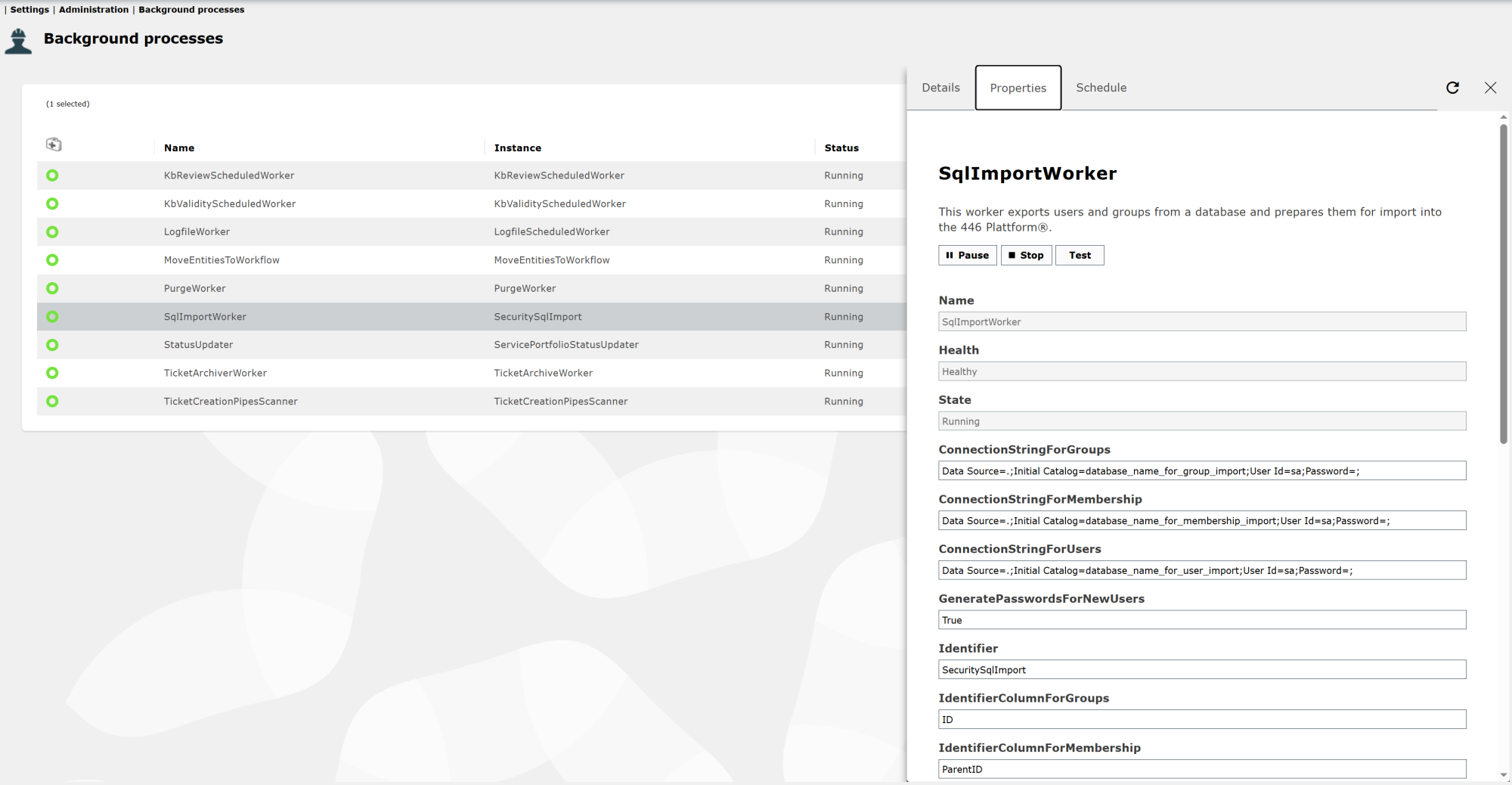
Select the SecuritySqlImport worker from the list of installed workers. This will open the settings. All of the properties listed here can be found on the Properties tab.
-
ProviderForGroups:
Here, you specify which database provider should be used to access the database from which the groups will be retrieved. This depends on whether you are using a Microsoft SQL Server, an Oracle Server, or a different product.
Note:
Possible provider are:
System.Data.SqlClient
System.Data.OleDb
System.Data.Odbc
System.Data.OracleClient
These also apply to the following two properties.
-
ProviderForMembership:
Here, you specify which database provider should be used to access the database from which the memberships will be retrieved. This depends on whether you are using a Microsoft SQL Server, an Oracle Server, or a different product.
-
ProviderForUsers:
Here, you specify which database provider should be used to access the database from which users will be retrieved. This depends on whether you are using a Microsoft SQL Server, an Oracle Server, or another product.
-
ConnectionStringForGroups:
The connection string for connecting to the database from which the groups are to be retrieved.
-
ConnectionStringForMembership:
This is the connection string used to connect to the database from which the membership properties are retrieved. These properties include hierarchical connections between groups and users, as well as between groups themselves.
-
ConnectionStringForUsers:
The connection string for connecting to the database from which the users are to be retrieved.
-
StatementForGroups:
The SQL statement that retrieves the groups is specified here.
-
StatementForMembership:
The SQL statement that retrieves the memberships is specified here.
-
StatementForUsers:
The SQL statement that retrieves the users is specified here.
-
SqlCommandTimeoutInSeconds:
This specifies how long to wait for a response from the database before registering a timeout. The default value is 30 seconds. If the response is not registered within this time frame, a timeout is returned.
-
PasswordsForNewUsers_Generate:
Specifies whether a password should be generated for new users. Possible values are True and False.
Note:
If new users are imported from an XML file, they will not be able to log in unless a password is generated.
If XML import is used to update existing users, this option should be set to False. This will retain the user's current password.
If this option is set to True, a new password will be generated during import. However, this only applies to new users. No new password is generated for existing users; only their user properties are updated. If new passwords are to be generated, care should be taken to ensure that passwords are not retrieved when querying users (see StatementForUsers). All queried fields from the source are stored as properties in the XML. This means that passwords would be written to the XML in plain text, as they are stored in the data source.
If this option is set to False, the password must be requested from the data source for each user. The password is then stored in encrypted form in the XML and transferred to the user database during import. To ensure the importer knows which field contains the password, specify the field name in the PropertyNameForNewUserBehavior property.
-
PasswordsForNewUsers_FieldName:
This option is only required if the PasswordsForNewUsers_FieldName option is set to False. If this is the case, the name of the field containing the password must be specified here.
Example:
If the result of the SQL query contains the columns First_name, Last_name, Email, Address, Password, then the column name “Password” must be entered here.
-
IdentifierColumnForGroups:
Here, you specify the name of the column (field) that contains the unique ID for the groups.
-
IdentifierColumnForMembership:
Here, you specify the name of the column (field) that contains the unique parent ID for the membership. This parent ID must exist as an ID in the table with the groups.
-
IdentifierColumnForUsers:
Here, you specify the name of the column (field) that contains the unique ID for the users.
-
InvokeImporterAfterWritingXml:
This specifies whether the worker should automatically start the group/user import after writing the XML file. Possible values are True and False.
-
OutputFile:
The complete path to the output file is specified here. If you want to start the import immediately after creating the file (property InvokeImporterAfterWritingXml set to True), the path should be the same as the one configured in the group import (see Configuring the Import for a User Group).
An assignment schema is still required to import the groups and users into the user management system. Here is an Example::
<AssignmentSchemes>
    <Scheme objectguid="60b7001199c54e8fb22b6525fbce841b" useOnlyCurrentUniqueId="false" friendlyName="Standard">
        <Group>
            <Alias>organizationalUnit</Alias>
            <Alias>group</Alias>
            <Alias>builtinDomain</Alias>
            <Alias>container</Alias>

            <Assignment source="name" destination="{Name}" />
            <Assignment source="description" destination="description" />
        </Group>
        <User>
            <Alias>user</Alias>
            <Alias>foreignSecurityPrincipal</Alias>

            <Assignment source="sAMAccountName" destination="{LoginName}" />
            <Assignment source="{Domain}+'\'+sAMAccountName" destination="{LoginName0}" />
            <Assignment source="userPrincipalName" destination="{LoginName1}" />
            <Assignment source="{Domain}+'\'+sAMAccountName" destination="{LoginName2}" >
                <Replace original="ADS-Name\" replaced="PreWindows2000Domain\" />
            </Assignment>

            <Assignment source="mail" destination="exchangealias" />
            <Assignment source="legacyExchangeDN" destination="legacyExchangeDN" />

            <Assignment source="givenName" destination="firstname" />
            <Assignment source="sn" destination="lastname" />
            <Assignment source="department" destination="department" />
            <Assignment source="telephoneNumber" destination="phonedirect" />
            <Assignment source="mobile" destination="phonemobile" />
            <Assignment source="mail" destination="email" />
            <Assignment source="company" destination="company" />
            <Assignment source="streetAddress" destination="street" />
            <Assignment source="postalCode" destination="zip" />

            <DefaultAttribute name="MessagingManager.DeliveryDisabled" value="false" />
            <DefaultAttribute name="MessagingManager.UnifiedEmailDelivery" value="True" />
            <DefaultAttribute name="MessagingManager.SmsDelivery" value="False" />
            <DefaultAttribute name="MessagingManager.PagerDelivery" value="False" />
        </User>
    </Scheme>

    <Scheme objectguid="2348001199c54e8fb22b6525fbce841b" useOnlyCurrentUniqueId="false" friendlyName="XML">
        <Group>
            <Assignment source="name" destination="{Name}" />
        </Group>
        <User>
            <Assignment source="ID" destination="{LoginName}" />

            <Assignment source="Firstname" destination="firstname" />
            <Assignment source="Lastname" destination="lastname" />
            <Assignment source="EMail" destination="email" />
        </User>
    </Scheme>

</AssignmentSchemes>
The example shows two configured schemas. The first is the standard LDAP import schema, and the second is the XML import schema.
Further information on the assignment scheme can be found in the chapter Import.
This worker reads from a CSV file, and creates or updates tickets. One column of the CSV file has to be defined as the Identifier column. The worker searches for any non-deleted ticket that has that identifier, and will update the existing ticket. Otherwise, it will create a new ticket.
If there are multiple rows with the same identifier value in the CSV file, their field values are combined, if different from each other. Therefore, different combination types can be specified in the mapping. The worker uses the feature key EnableCsvToTicketImporter.
Note:
The CSV file has to have the column names in the first row. A row will be skipped when all fields are empty in the CSV import file.
It is a scheduled worker (thus, not pausable) and has the following properties:
-
ColumnDelimeter:
One character, which is used as the CSV column delimeter. Default is ';'.
-
CsvFilePath:
Full path with filename to the CSV file.
-
PauseInMillisecondsAfterNewTicket:
Whenever a new ticket is created by the importer, it waits the configured amount of time, before continuing with the next record. This is to avoid load spikes at the workflow manager. Default is 1000, means: one second.
-
PauseInMillisecondsAfterUpdateTicket:
Whenever an existing ticket is updated by the importer, it waits the configured amount of time, before continuing with the next record. This is to avoid load spikes at the workflow manager. Default is 100, means: one tenth of a second.
-
MappingFileName:
Name of the mapping file, which defaults to FieldMapping.xml. The mapping file has to be located in the worker directory.
Note:
When Test is clicked in the worker admin tool, an import is started. This avoids updating the schedule string constantly for test purposes.
The FieldMapping XML file
<?xml version="1.0" encoding="utf-8" ?>
<Csv2TicketMapping
    client="default"
    ticketSchema="incident"
    identifierField="Opportunity_Id"
    identifierColumnWithTicketId=""
    creatorUser="login_name_admin"
    affectedUser="login_name_admin"
    workflowOnChange="0487c756-23c0-4fbf-b754-df391233a609"
    deleteFileAferImport="false"
    deleteFileFolderAfterImport="false">
    <ImportNotificationTicket enabled="False">
        <Identifier type="TicketDataId" location="DirectoryName" />
        <Workflow onSuccess="1563f478-459b-4d6c-9054-80392c7040c3"
            onError="ab5dfd34-76f9-42f2-93f3-d904d256c9d9" />
    </ImportNotificationTicket>
    <TicketStates>
        <State value="Closed" />
    </TicketStates>
    <Fields>
        <Field source="Division" target="Division" />
        <Field source="Company" target="CompanyName" >
            <SpecialBehavior value="DoNotUpdate" logicalOperator="and">
                <Condition operator="notequals" value="NA" />
                <Condition operator="notequals" value="Dumb" />
            </SpecialBehavior>
        </Field>
        <Field source="Location" target="City">
            <SpecialBehavior value="CreateNoTicket">
                <Condition operator="equals" value="NA" />
                <Condition operator="equals" value="Dumb" />
            </SpecialBehavior>
        </Field>
        <Field source="Amount (gross)" target="Amount" combine="sum" />
        <Field source="Opportunity_Id" target="OpportunityId" />
        <Field source="CiField1" valueSource="CiField1Value" target="CiField1" />
        <Field source="KeyValueField1" valueSource="KeyValueField1Value" target="KeyValueField1" />
    </Fields>
    <Properties>
        <Property target="creatorUser">
            <PrincipalAttribute source="Opp. manager (First name)" target="firstname" />
            <PrincipalAttribute source="Opp. manager (Last name)" target="lastname" />
        </Property>
        <Property target="affectedUser">
            <PrincipalAttribute source="Customer (First name)" target="firstname" />
            <PrincipalAttribute source="Customer (Last name)" target="lastname" />
        </Property>
    </Properties>
</Csv2TicketMapping>
Configuration of the FieldMapping XML file
Attributes of the Document Element node Csv2TicketMapping:
-
client:
Is either default (which makes the first client to be used), a client ObjectGUID, or a client name.
-
ticketSchema:
FriendlyName or ObjectGUID of a ticket schema.
-
identifierField:
This is the field which holds the identifier, by which an existing ticket is searched to update. If there is no ticket with that field found, a new ticket is created. This attribute has to point to one of the Field nodes in the mapping, and has to match the source attribute there. The identifierField attribute may be empty (not: missing). If empty, the importer won't look for existing tickets, but create exactly one ticket for every row of the CSV file.
-
identifierColumnWithTicketId:
If the field specified here contains a ticket number in the CSV file, the importer will use it to find a ticket. If the field in the CSV is empty or no ticket with the specified ticket number is found, the importer will create a new ticket. Attention: This option cannot be used in conjunction with the identifierField option. Only one of the two options can be used.
-
creatorUser:
Login name or ObjectGUID of a user to be used as the default creator user.
-
affectedUser:
Login name or ObjectGUID of a user to be used as the default affected user.
-
workflowOnChange:
Optional. If missing, empty or Guid.Empty, no workflow is started after an existing ticket has been updated. Otherwise, it has to contain the ObjectGUID of a workflow.
-
deleteFileAfterImport:
Optional. If True, then the CSV file is deleted after it has been processed.
-
deleteFileFolderAfterImport:
Optional. If True, then the parent folder of the CSV file is deleted after the file has been processed but only if it is empty. So, it can be really used only together with the deleteFileAfterImport setting.
Attributes of the individual ticket field mapping nodes (Field):
-
source:
Name of the column in the CSV file to map.
-
valueSource:
Optional. Name of the column in the CSV file to map for the ticket field VALUE. The attribute source maps only to the ticket field TEXT.
-
target:
FriendlyName of the ticket field where the content should be written to.
-
combine:
Optional attribute. If missing, it defaults to AppendIfDifferent. Meanings of the different combine types:
Overwrite:
If the value is different from the previous value, the previous value is overwritten.
AppendIfDifferent:
If the value is different from the previous value, the new value is appended to the existing value in a new line.
AppendIfDifferentWithBrTag:
Same as AppendIfDifferent, but with an additional <br> tag for each new line character.
Append:
This option just appends the values on a new line, ignoring if the value already exists or not.
AppendWithBrTag:
This option works as the Append, but it also adds <br /> tags.
Sum:
Requires that the values are integers, and adds the value of the previous and current value together, building the sum.
-
Optional child nodes of the type SpecialBehavior:
value:
CreateNoTicket:
This prevents the worker from creating new a ticket, when the value of the field matches the underlying condition(s). Existing tickets will still be updated.
DoNotUpdate:
This prevents the worker from updating an existing ticket, when the value of the field matches the underlying condition(s). If no existing ticket is found, new tickets will still be created.
logicalOperator:
or:
One of the conditions has to match. This is the default behavior if the logicalOperator attribute is missing.
and:
All of the conditions have to match.
Child nodes of the type Condition:
operator:
equals:
The imported value has to match the specified value attribute, the check is done case insensitive.
notequals:
The imported value has to be different than the specified value attribute, the check is done case insensitive.
value:
A given text to be matched.
Attributes of the ticket property mapping nodes (Property):
-
target:
Name of the property. creatorUser and affectedUser are supported. Logic for the affected group: main group of the affected user. This way, these users can be set for each ticket according to the CSV file instead of using the default users.
-
Child nodes of the type PrincipalAttribute:
source:
Name of the column in the CSV file to map.
target:
Name of the user attribute to which the content has to match.
Attributes of the optional ticket status white list mapping nodes (State):
-
value:
FriendlyName or ObjectGUID of a ticket status. A ticket will be updated only when it has the given status (multiple status can be allowed using multiple nodes).
Attributes of the optional ImportNotificationTicket node (ImportNotificationTicket):
-
enabled:
If set to True, then a ticket will be searched which will be modified after the CSV file has been processed: in case of an error, an error log file will be attached to that ticket. Plus, the ticket can be moved to certain workflows after the CSV file has been processed. If the node ImportNotificationTicket is missing, its functionality defaults to False. In case a notification ticket is available, all created tickets from the CSV file are created as successors of it.
-
Child node Identifier attributes:
type:
The only supported value is TicketDataId. Means: the value must match with the internal ticket data id.
location:
The only supported value is DirectoryName: Means: the parent directory name of the CSV file contains the ticket identifier.
Example: C:/../<TicketDataId>/ImportFile.csv
-
Child node Workflow attributes:
onSuccess:
GUID of the workflow where the specified ticket will be moved to after the CSV import was successful.
onError:
GUID of the workflow where the specified ticket will be moved to after the CSV import has failed for any reason.
Note:
Every source column in the CSV file can be mapped to multiple ticket fields (for instance with different combination types).
When multiple ticket schemes shall be used you need to re-configure the worker or use multiple worker instances.
The Worker Send and Receive are used to exchange and synchronize ticket information between different 446 platforms. Tickets that should be synchronized must be explicitly marked for this purpose (plug-in: MarkForSync).
For the synchronization of a ticket, the send worker writes all log entries of the ticket into a synchronization database. The Receive Worker running on the other side fetches these entries and processes them accordingly.
Warning:
Due to the implementation of the new history there are currently two different entries. As long as not all platforms to be synchronized can handle the new protocol, the synchronization may only be done with the old entries.
Controlled by the Client Config Setting Key: UseOldHistoryForSynchronization (Standard False)
With the client config key Isonet.Synchronisation.IsEnabled the synchronization can be activated or deactivated.
The following ticket information can be transferred:
| Affected user | |
|---|---|
| Value | Name of the affected user according to UserNamePattern from Send-Worker (settings.json) |
|
Destination |
Ticket field on target platform, corresponding to TargetAffectedUserFieldFriendlyName from Receive-Worker (settings.json) |
| When | For initial ticket synchronization and for each change of the affected user |
| Ticket creator | |
|---|---|
| Value | Name of ticket creator according to UserNamePattern from Send-Worker |
|
Destination |
Ticket field on target platform, corresponding to TargetCreatorFieldFriendlyName from Receive-Worker |
| When | Only for initial ticket synchronization |
| Ticket owner | |
|---|---|
| Value | Name of the owner according to UserNamePattern from Send-Worker |
|
Destination |
Ticket field on target platform, corresponding to TargetOwnerFieldFriendlyName from Receive-Worker |
| When | At initial ticket synchronization and every change of ticket owner |
| Group of ticket owner | |
|---|---|
| Value | Name of the group |
|
Destination |
Ticket field on target platform, corresponding to TargetOwnerGroupFieldFriendlyName from Receive-Worker |
| When | During initial ticket synchronization and each change of ticket owner or owner group |
| Ticket status | |
|---|---|
| Value |
Assigned status name according to TicketStatusMappings from Send-Worker (based on FriendlyName of ticket status). If there is no mapping to the status to be transferred, the FriendlyName is used. |
|
Destination |
Ticket field on target platform, corresponding to TargetStatusFieldFriendlyName from Receive-Worker |
| When | At initial ticket synchronization and at every change of the ticket status |
| FullId of the ticket | |
|---|---|
| Value | The FullId of the ticket |
|
Destination |
Ticket field on target platform, corresponding to TargetTicketFullIdFieldName from Receive-Worker |
| When | Only for initial ticket synchronization |
| Ticket comments | |
|---|---|
| Value | Localized time, Visibility, Creator name according to UserNamePattern of the send worker, Comment text, Ticket status according to status mapping of the send worker |
|
Destination |
Ticket comments on target platform Comment text according to TicketCommentPattern of the Receive-Worker Allowed placeholders: $timestamp$ / $user$ / $state$ / $text$ |
| When | At initial ticket synchronization and at each and every creation of a new comment |
| Ticket fields | |
|---|---|
| Value | Ticket fields (Value, Text) according to AllowedTicketFields from Send-Worker |
|
Destination |
Ticket fields according to SchemeFieldMappings of the Receive-Worker |
| When | At initial ticket synchronization and each change of the configured ticket fields (AllowedTicketFields) |
| Workflow | Workflows according to WorkflowOnFieldChange property in SchemeFieldMappings of the Receive-Worker |
| E-mails | |
|---|---|
| Value | Attached e-mails and their file attachments (no system mails) |
|
Destination |
Ticket e-mails on target platform |
| When | At initial ticket synchronization and every time e-mails are sent from a ticket (no system mails) |
| Ticket files | |
|---|---|
| Value | All files attached to the ticket |
|
Destination |
Ticket attachments on destination platform |
| When | At initial ticket synchronization and when adding or deleting ticket files |
| Note | Feature File size restriction is not considered on target system, deactivation of files is not transferred |
| Ticket solution | |
|---|---|
| Value | Text of the internal and external solution or summary |
|
Destination |
Ticket solution on destination platform |
| When | At initial ticket synchronization and at every change of the ticket solution |
Note:
The synchronized changes are executed in the user context on the corresponding platform, which is configured in the settings.config of the corresponding worker (SyncPrincipal). This means that this user needs all necessary permissions to perform the corresponding actions.
The license key EnableWorkerManagement makes the workers visible in Worker Management.
| Worker name | Edition | License key |
|---|---|---|
| CiImportWorker | Ultimate Edition | EnableCMDBImport |
| CMDBTriggers | Ultimate Edition | EnableCMDBImport |
| CreationWorker | Standard Edition | Default configuration |
| CsvToTicket |
Ultimate Edition | EnableSqlTo |
| LverExportToCsv | Standard Edition | Default configuration |
| MoveTicketsTo (Based on a SQL Statement) |
Standard Edition | Default configuration |
| ExcelExporter | Standard Edition | Default configuration |
| ExcelImport |
Standard Edition | Default configuration |
| CollectorWorker | Ultimate Edition | EnableEventManagement |
| FilteringWorker | Ultimate Edition | EnableEventManagement |
| KbExportWorker | Enterprise Edition | EnableKbExport |
| TaskReminder | Enterprise Edition | EnableTaskManagement |
| TaskScheduler | Enterprise Edition | EnableTaskScheduling |
| Transport Manager | Ultimate Edition (Add-ons) | EnableTransportManager |
| UpdateCiTitle | Ultimate Edition | EnableConfiguration |
| HistoryConverter | Standard Edition | Default configuration |
| KbReview |
Enterprise Edition | EnableKbTemplate |
| KbValidity |
Enterprise Edition | EnableKbTemplate |
| LogfileWorker | Standard Edition | Default configuration |
| MoveEntitiesTo |
Standard Edition | Default configuration |
| PurgeWorker | Standard Edition | Default configuration |
| SqlImportWorker | Standard Edition Enterprise Edition (for importing via XML user import) |
EnableXmlUserImport |
| ServiceImporter | Customized | EnableServiceImport |
| ServiceNow |
Customized | EnableServiceNow |
| StatusUpdater | Ultimate Edition | EnableServicePortfolio |
| SqlToCsvExport | Ultimate Edition | EnableSqlToCsv |
| TicketArchiver |
Standard Edition | Default configuration |
| TicketCreation |
Standard Edition | Default configuration |
| TicketFieldValue |
Standard Edition | Default configuration |
| Ticket |
Customized (Common) | EnableTicket |
| Ticket |
Customized (Common) | EnableTicket |
| WorkTime |
Standard Edition | Default configuration |


 Copyright (c) 2000-2026 Isonet AG