Searching for Tasks
The following search parameters are available for the type Task:
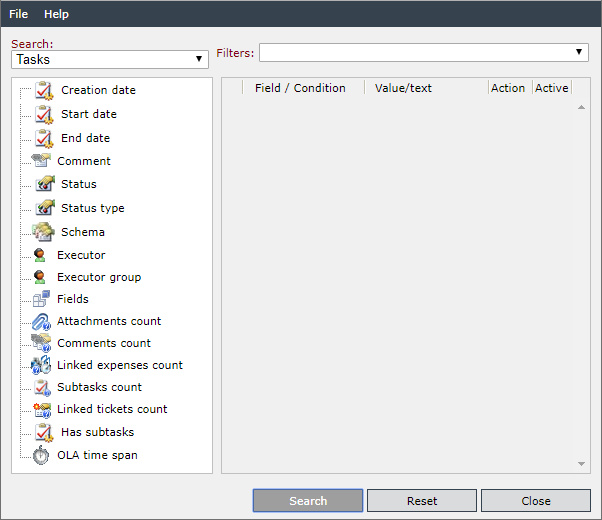
Creation date: Creation date of the task. You can select Greater, Greater or Equal, Smaller, Smaller or Equal, Equal, or Not Equal as a condition here. As a value, a date and a time have to be entered here.
Start date: Enter a date here and the tasks will be scanned for your start date. You can select Greater, Greater or Equal, Smaller, Smaller or Equal, Equal, or Not Equal as a condition.
End date: Enter a date here and the tasks will be scanned for your end date. You can select Greater, Greater or Equal, Smaller, Smaller or Equal, Equal, or Not Equal as a condition.
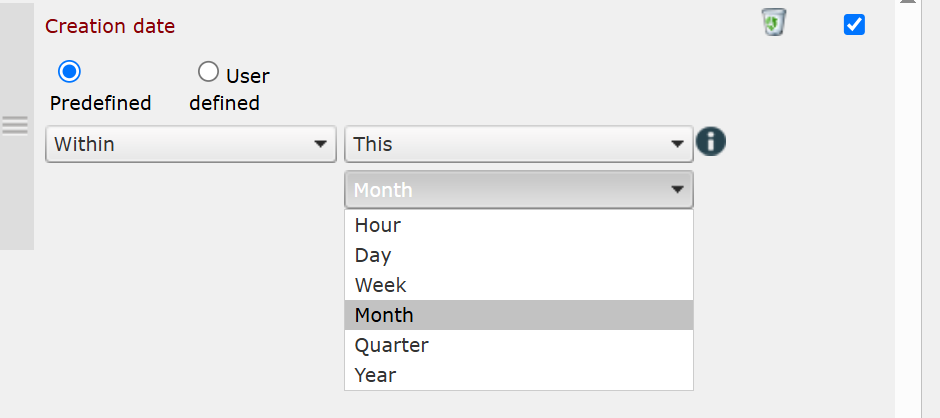
It is possible to select predefined intervals for the above search parameters. For this purpose, it is necessary to switch from User-defined to Predefined. You can then select the conditions Today, Yesterday, Previous, or Coming. For example, you can select Coming Week.
Comment: The tasks‘ comments will be scanned here. As a condition, Including or Excluding can be selected.
Status: Via this search field, tasks having reached the specified status will be searched. The conditions available here are Equal and Not Equal.
Status type: Select one of the preset status types as a value. The conditions available here are Equal and Not Equal.
Schema: Tasks of the selected schema will be searched. The conditions available here are Equal and Not Equal.
Executor: Tasks are searched for the named executor. The search conditions available are Equals and Not equals.
Executor group: Tasks are searched for the named executor group. The search conditions available are Equals and Not equals. A group can be selected as value.
Fields: Individual fields will be scanned for the value. As a condition, Including or Excluding can be selected.
Attachments count: Tasks are searched for the number of contained file attachments. The search conditions available are greater, greater or equal, smaller, smaller or equal, equals or not equals. Please enter only numbers in the value field.
Comments count: Tasks are searched for the number of comments created. The search conditions available are greater, greater or equal, smaller, smaller or equal, equals or not equals. Please enter only numbers in the value field.
Linked expenses count: Tasks are searched for the expenses linked to a task (created in a task). The search conditions available are greater, greater or equal, smaller, smaller or equal, equals or not equals. Please enter only numbers in the value field.
Subtasks count: Tasks are searched for condition if subtasks were created. for tasks are searched for the expenses linked to a task (created in a task). The search conditions available are greater, greater or equal, smaller, smaller or equal, equals or not equals. Please enter only numbers in the value field. Subtasks can only be first generation tasks. If a task has been created from a subtask, it is not a subtask.
Linked tickets count: Tasks are searched for the number of tickets they are linked with (tickets created in a task). The search conditions available are greater, greater or equal, smaller, smaller or equal, equals or not equals. Please enter only numbers in the value field.
Has subtasks: Tasks are searched for the expenses linked to a task (created in a task). The search conditions available are Has subtask and Has no subtask.
OLA timespan: Tasks are searched for the OLA timespan that can be defined in every task schema. The search conditions available are greater, greater or equal, smaller, smaller or equal, equals or not equals. The format for the time span is minutes.


 Copyright (c) 2000-2026 Isonet AG